> ## Documentation Index
> Fetch the complete documentation index at: https://docs.vibely.sh/llms.txt
> Use this file to discover all available pages before exploring further.
# Store API keys with secrets
> Store API keys and other sensitive values as encrypted project secrets that your Supabase Edge Functions read at runtime, and learn what belongs in .env instead.
Secrets store sensitive values such as API keys, tokens, and credentials without putting them in your code. They are encrypted, made available to your Supabase Edge Functions, and never reach the browser. Each secret belongs to one project and is read while your app runs. Values a project needs only while it installs packages, such as a private npm token, are [build secrets](/features/build/build-secrets) instead.
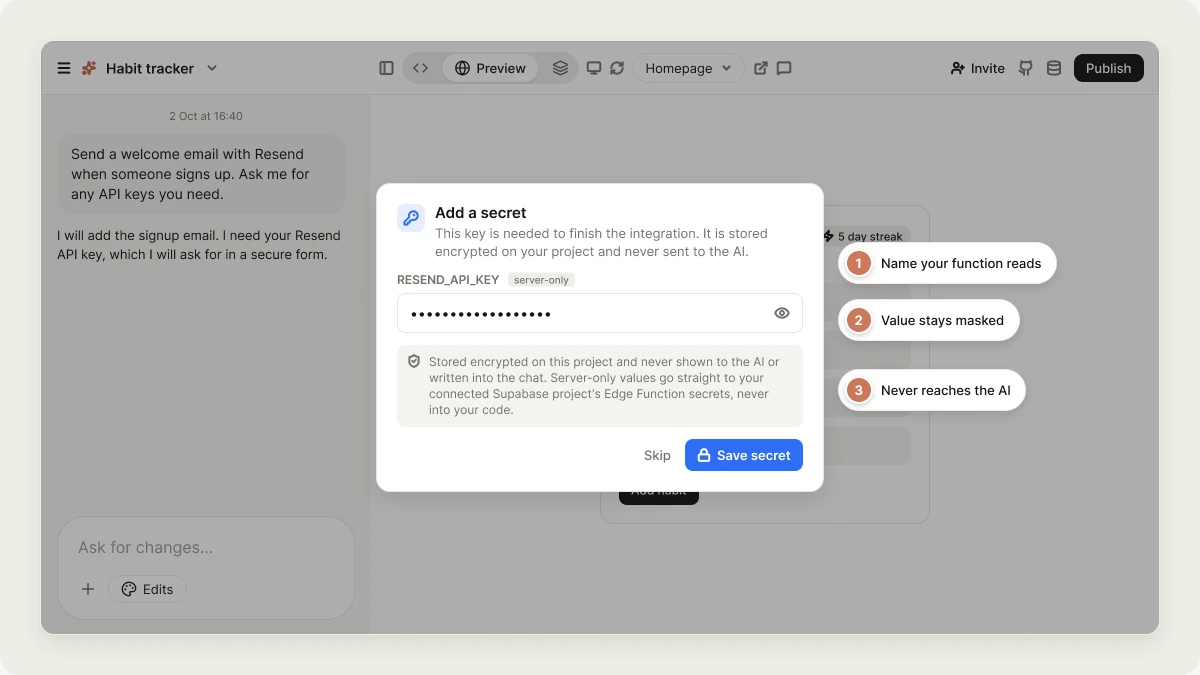 You usually don't add secrets by hand. When a feature needs one, Vibely asks you for it through a secure form in the project chat. For example:
```text wrap theme={"system"}
Send a welcome email with Resend when someone signs up. Ask me for any API keys you need.
```
Secrets are consumed by Supabase Edge Functions, so your project needs a linked [Supabase](/integrations/supabase) project for them to take effect. If it isn't linked, Vibely shows the **Connect Supabase** card alongside the request.
## Understanding a secret prompt
When the agent needs a key, it shows an **Add secret** card in the chat. The value you type is stored as an encrypted secret and is never shown to the AI. Before entering a value, check:
* **The secret name**, for example `RESEND_API_KEY` or `OPENAI_API_KEY`. This is the exact name your Edge Function reads.
* **The message before the card.** The agent explains what the key is for and where to find it.
* **The provider's dashboard.** If you aren't sure which value to paste, open the provider's site (Resend, OpenAI, Twilio, and so on) and find the key with the same name.
When an integration needs several keys, such as Twilio's account SID, auth token, and phone number, the agent asks for all of them in one card. You can fill some fields and leave others empty. Only what you fill in is saved, and the agent builds against the keys it received.
If you don't want to add a key yet, skip the card. Anything that depends on it won't work until you add it. When you're ready, ask the agent in the chat and it opens the form again, or add the key yourself in Secrets.
Don't paste API keys into the chat message itself. The chat log is saved. If Vibely detects a key in your message, it removes it before sending and offers **Open Secrets** so you can store it properly.
## Manage secrets
To manage a project's secrets yourself, open the project name menu in the editor, select **Project settings**, then select **Secrets**.
The list shows each secret's name and when it was last updated. Values are never shown.
* **Add secret** opens a dialog where you can enter one or more name and value pairs. Select **Add another** for more rows. Names are saved in upper case and must start with a letter or underscore and contain only letters, numbers, and underscores.
* **Delete** removes a secret after you confirm. This can't be undone. If a feature still needs the value, it stops working until you add it again.
* To change a value, add the secret again with the same name. Secrets are write-only, so a value can be replaced but never read back. If you lose a key, generate a new one at the service that issued it.
Secrets marked **Managed** are set by Vibely and can't be deleted from this list.
### Where secrets go
Secrets are stored in Vibely's encrypted secret store and are never written into your project's files. That means connecting the project to [GitHub](/integrations/github), exporting it, or downloading it can't expose them. Before each Edge Function deploy, Vibely pushes your secrets to your linked Supabase project's Edge Function secret store, where your functions read them:
```ts theme={"system"}
const apiKey = Deno.env.get("RESEND_API_KEY")
```
This works the same way for web and mobile projects. Supabase Edge Functions are the only server-side runtime, so never read a secret from your app's client code.
### Workspace secrets
Owners and admins can also set secrets for the whole workspace in **Settings → Build secrets**, in the **Secrets** card at the top. A workspace secret is available to every project in the workspace, the same way a project secret is. If a project secret has the same name, the project value wins for that project.
## Secrets vs. public environment variables
Secrets are for **server-side** values only. Anything with a public prefix is compiled into the app bundle that every visitor downloads:
| Prefix | Platform |
| - | - |
| `VITE_` | Web |
| `EXPO_PUBLIC_` | Mobile |
| `NEXT_PUBLIC_` | Next.js |
* **Use Secrets for** `STRIPE_SECRET_KEY`, `RESEND_API_KEY`, `OPENAI_API_KEY`, and anything else that must never reach a browser or phone.
* **Use `.env` for** values that are public by design, such as a Supabase anon key or a Stripe publishable key. The agent writes these to your project's `.env` file, where you can see them in the [code editor](/features/projects/code-editor).
Vibely refuses to store a secret under a public prefix, because a value named `VITE_STRIPE_SECRET_KEY` would be published inside your app's JavaScript. If you're tempted to add a public prefix to something called `..._SECRET_KEY`, that's the sign the call belongs in an Edge Function.
## Reserved names
Names starting with these prefixes are managed by Vibely and can't be created or overwritten:
* `SUPABASE_`: for example `SUPABASE_URL`, `SUPABASE_ANON_KEY`, and `SUPABASE_SERVICE_ROLE_KEY`, set from your linked Supabase project.
* `VIBELY_`: for example `VIBELY_AI_KEY` and `VIBELY_AI_URL`, which your app's [Vibely AI](/features/backend/ai) features use.
You don't need to add these. They are already available to your Edge Functions, for example `Deno.env.get("SUPABASE_SERVICE_ROLE_KEY")`.
## FAQ
No. Secrets are write-only. You can replace or delete a secret, but never read its value back.
No. A remix copies project files only, and secrets are never in the files. Workspace secrets and connected services aren't copied either.
Stripe has its own connection flow that validates the key format. Ask the agent to add payments and it opens the Stripe form. See [Stripe](/integrations/stripe).
If the value must stay private (payment keys, AI provider keys, service credentials), use a secret. If it has a `VITE_` or `EXPO_PUBLIC_` prefix and is safe to be public, it belongs in `.env`.
## Related
Workspace credentials for package installs and builds.
The backend your Edge Functions run on.
Where secrets belong, and what a leaked key means.
Services that connect with an account instead of a key.
## Related topics
- [FAQ](/faq.md)
- [Connect tools, services, and APIs](/integrations/connectors/overview.md)
- [Privacy & security settings](/features/workspace/privacy-security.md)
- [Security best practices for Vibely apps](/features/security/best-practices.md)
- [Connector authentication and credentials](/integrations/connectors/auth.md)
This documentation is built and hosted on [Mintlify](https://mintlify.com), a developer documentation platform.
You usually don't add secrets by hand. When a feature needs one, Vibely asks you for it through a secure form in the project chat. For example:
```text wrap theme={"system"}
Send a welcome email with Resend when someone signs up. Ask me for any API keys you need.
```
Secrets are consumed by Supabase Edge Functions, so your project needs a linked [Supabase](/integrations/supabase) project for them to take effect. If it isn't linked, Vibely shows the **Connect Supabase** card alongside the request.
## Understanding a secret prompt
When the agent needs a key, it shows an **Add secret** card in the chat. The value you type is stored as an encrypted secret and is never shown to the AI. Before entering a value, check:
* **The secret name**, for example `RESEND_API_KEY` or `OPENAI_API_KEY`. This is the exact name your Edge Function reads.
* **The message before the card.** The agent explains what the key is for and where to find it.
* **The provider's dashboard.** If you aren't sure which value to paste, open the provider's site (Resend, OpenAI, Twilio, and so on) and find the key with the same name.
When an integration needs several keys, such as Twilio's account SID, auth token, and phone number, the agent asks for all of them in one card. You can fill some fields and leave others empty. Only what you fill in is saved, and the agent builds against the keys it received.
If you don't want to add a key yet, skip the card. Anything that depends on it won't work until you add it. When you're ready, ask the agent in the chat and it opens the form again, or add the key yourself in Secrets.
Don't paste API keys into the chat message itself. The chat log is saved. If Vibely detects a key in your message, it removes it before sending and offers **Open Secrets** so you can store it properly.
## Manage secrets
To manage a project's secrets yourself, open the project name menu in the editor, select **Project settings**, then select **Secrets**.
The list shows each secret's name and when it was last updated. Values are never shown.
* **Add secret** opens a dialog where you can enter one or more name and value pairs. Select **Add another** for more rows. Names are saved in upper case and must start with a letter or underscore and contain only letters, numbers, and underscores.
* **Delete** removes a secret after you confirm. This can't be undone. If a feature still needs the value, it stops working until you add it again.
* To change a value, add the secret again with the same name. Secrets are write-only, so a value can be replaced but never read back. If you lose a key, generate a new one at the service that issued it.
Secrets marked **Managed** are set by Vibely and can't be deleted from this list.
### Where secrets go
Secrets are stored in Vibely's encrypted secret store and are never written into your project's files. That means connecting the project to [GitHub](/integrations/github), exporting it, or downloading it can't expose them. Before each Edge Function deploy, Vibely pushes your secrets to your linked Supabase project's Edge Function secret store, where your functions read them:
```ts theme={"system"}
const apiKey = Deno.env.get("RESEND_API_KEY")
```
This works the same way for web and mobile projects. Supabase Edge Functions are the only server-side runtime, so never read a secret from your app's client code.
### Workspace secrets
Owners and admins can also set secrets for the whole workspace in **Settings → Build secrets**, in the **Secrets** card at the top. A workspace secret is available to every project in the workspace, the same way a project secret is. If a project secret has the same name, the project value wins for that project.
## Secrets vs. public environment variables
Secrets are for **server-side** values only. Anything with a public prefix is compiled into the app bundle that every visitor downloads:
| Prefix | Platform |
| - | - |
| `VITE_` | Web |
| `EXPO_PUBLIC_` | Mobile |
| `NEXT_PUBLIC_` | Next.js |
* **Use Secrets for** `STRIPE_SECRET_KEY`, `RESEND_API_KEY`, `OPENAI_API_KEY`, and anything else that must never reach a browser or phone.
* **Use `.env` for** values that are public by design, such as a Supabase anon key or a Stripe publishable key. The agent writes these to your project's `.env` file, where you can see them in the [code editor](/features/projects/code-editor).
Vibely refuses to store a secret under a public prefix, because a value named `VITE_STRIPE_SECRET_KEY` would be published inside your app's JavaScript. If you're tempted to add a public prefix to something called `..._SECRET_KEY`, that's the sign the call belongs in an Edge Function.
## Reserved names
Names starting with these prefixes are managed by Vibely and can't be created or overwritten:
* `SUPABASE_`: for example `SUPABASE_URL`, `SUPABASE_ANON_KEY`, and `SUPABASE_SERVICE_ROLE_KEY`, set from your linked Supabase project.
* `VIBELY_`: for example `VIBELY_AI_KEY` and `VIBELY_AI_URL`, which your app's [Vibely AI](/features/backend/ai) features use.
You don't need to add these. They are already available to your Edge Functions, for example `Deno.env.get("SUPABASE_SERVICE_ROLE_KEY")`.
## FAQ
No. Secrets are write-only. You can replace or delete a secret, but never read its value back.
No. A remix copies project files only, and secrets are never in the files. Workspace secrets and connected services aren't copied either.
Stripe has its own connection flow that validates the key format. Ask the agent to add payments and it opens the Stripe form. See [Stripe](/integrations/stripe).
If the value must stay private (payment keys, AI provider keys, service credentials), use a secret. If it has a `VITE_` or `EXPO_PUBLIC_` prefix and is safe to be public, it belongs in `.env`.
## Related
Workspace credentials for package installs and builds.
The backend your Edge Functions run on.
Where secrets belong, and what a leaked key means.
Services that connect with an account instead of a key.
## Related topics
- [FAQ](/faq.md)
- [Connect tools, services, and APIs](/integrations/connectors/overview.md)
- [Privacy & security settings](/features/workspace/privacy-security.md)
- [Security best practices for Vibely apps](/features/security/best-practices.md)
- [Connector authentication and credentials](/integrations/connectors/auth.md)
This documentation is built and hosted on [Mintlify](https://mintlify.com), a developer documentation platform.