> ## Documentation Index
> Fetch the complete documentation index at: https://docs.vibely.sh/llms.txt
> Use this file to discover all available pages before exploring further.
# Subagents
> Subagents help Vibely investigate larger tasks by splitting research and code exploration into focused, read-only investigations that run in parallel.
When a task needs more investigation, Vibely can start temporary, read-only subagents to research or inspect focused parts of the work. Each subagent works on one question, and Vibely can run several at the same time.
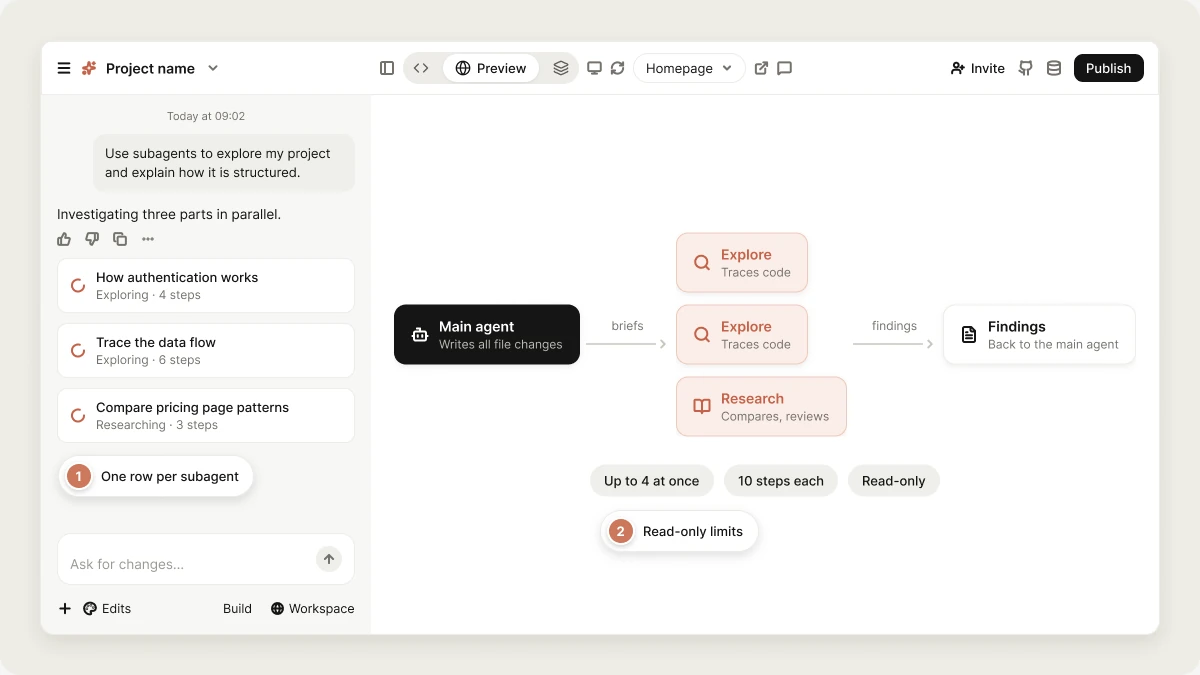 Subagents report their findings back to the main Vibely agent, which uses them to decide what to do next, continue building, or explain the result. Subagents inform the work, but they can't change your project. Every file change still comes from the main agent.
You don't need to configure subagents or choose when they run. Vibely decides when they help, based on your request.
## Why subagents help
Large requests often need a lot of reading before Vibely can act confidently: "how does authentication work here?" can mean a dozen files. Done in the main conversation, all of that source code stays in context for the rest of the session, which makes it harder to follow and more expensive on every later message.
A subagent reads those files in its own, separate context and returns only its findings. This helps in three ways:
* **Cleaner context**: Your requirements, decisions, and next steps stay easy to follow.
* **Parallel progress**: Independent questions are investigated at the same time instead of one after another.
* **More focused results**: Each subagent works on one bounded question with fresh context, which helps it return sharper findings.
## Subagent types
You may see two kinds of subagents in the project chat. Both investigate a focused question. The difference is the kind of answer Vibely needs.
* **Explore** is for answers that need a traceable trail through your code, such as how something works, where something is handled, or why something behaves a certain way. It returns a direct answer followed by the files and functions involved, in the order the code runs through them. Its row reads **Exploring** while it works.
* **Research** is for results in a specific shape, such as a comparison, a checklist, a review, or a recommendation, with the conclusion first. Its row reads **Researching** while it works.
## How subagents work
Subagents can search your project, read files, look at your database schema, read errors from your running preview, read files from other projects you've referenced, search the web, and use your [skills](/features/context/skills). They can't create, edit, or delete files, run commands, install packages, generate images, or take actions in connected tools.
Subagents start with fresh context. They don't see the chat, earlier messages, or anything Vibely has already read. Each one knows only what Vibely puts in its task briefing, such as the question, file paths, and constraints.
When Vibely starts subagents, each one appears as a row in the project chat with its task title, its status, and the number of steps it has taken. When a subagent finishes, Vibely receives its findings automatically. Subagents don't coordinate with each other: each reports back to the main agent, which combines the findings.
If one subagent fails, the others keep going and your request continues. The failed row shows **This investigation failed**, and Vibely can investigate that question itself.
If you asked for research or an explanation, Vibely usually shares what the subagents found. If you asked it to build something, it may use the findings and continue building without a separate summary.
### Limits
| Limit | Value |
| - | - |
| Subagents started at once | Up to 4, running in parallel |
| Steps per subagent | Up to 10 |
| Nesting | A subagent can't start its own subagents |
## Prompting Vibely to use subagents
To encourage Vibely to split up investigation work, mention subagents in your prompt and describe what you want investigated. This works best when the request has several parts, needs exploration of the project, or benefits from research before building. Vibely still decides whether to use them.
Subagents are available in [Build mode](/features/agent/build-mode) and [Plan mode](/features/agent/plan-mode).
```text wrap theme={"system"}
Use subagents to explore my project and explain how it's structured. I haven't touched this app in a while and want to understand the main pages, data flow, and important files before making changes.
```
```text wrap theme={"system"}
Use subagents to help me redo my pricing page. Research what makes a strong pricing page, look at my current page, and recommend what should change before building.
```
```text wrap theme={"system"}
Use subagents to investigate why my dashboard is sometimes slow. Look through the dashboard and everything connected to it, then tell me what might be causing it and how to fix it.
```
```text wrap theme={"system"}
Use subagents to help me plan comments and likes. Look at where they'd fit in my app and explain what building them would involve before I commit.
```
## FAQ
No. Keep using Vibely as usual. It decides when subagents help. Mentioning subagents in your prompt makes it more likely but doesn't guarantee it.
No. Subagents are read-only. They can search, read, and research, but they can't create, edit, or delete files. All project changes come from the main Vibely agent.
Yes. Vibely can run up to four in parallel when a request has independent parts.
In Build mode, subagents use model time like the rest of the work, and that usage is included in the cost of the message that started them. It's not a separate charge. It's often still cheaper than the alternative, which is carrying all the files they read through the rest of the conversation.
In [Plan mode](/features/agent/plan-mode), a message is priced by the work it took, including any subagents it ran.
Yes. Subagents are part of how Vibely works and don't need any setup.
## Related topics
Plan a change before Vibely builds it.
Implement changes and ask questions.
How the main agent works through a request.
The tools Vibely can use.
## Related topics
- [Plan a change in Plan mode](/features/agent/plan-mode.md)
- [Reference other projects in your workspace](/features/context/cross-project-referencing.md)
- [Work with Vibely in the project chat](/features/projects/chat.md)
- [Tools](/reference/engine/tools.md)
- [Build Mode Overview](/reference/engine/overview.md)
This documentation is built and hosted on [Mintlify](https://mintlify.com), a developer documentation platform.
Subagents report their findings back to the main Vibely agent, which uses them to decide what to do next, continue building, or explain the result. Subagents inform the work, but they can't change your project. Every file change still comes from the main agent.
You don't need to configure subagents or choose when they run. Vibely decides when they help, based on your request.
## Why subagents help
Large requests often need a lot of reading before Vibely can act confidently: "how does authentication work here?" can mean a dozen files. Done in the main conversation, all of that source code stays in context for the rest of the session, which makes it harder to follow and more expensive on every later message.
A subagent reads those files in its own, separate context and returns only its findings. This helps in three ways:
* **Cleaner context**: Your requirements, decisions, and next steps stay easy to follow.
* **Parallel progress**: Independent questions are investigated at the same time instead of one after another.
* **More focused results**: Each subagent works on one bounded question with fresh context, which helps it return sharper findings.
## Subagent types
You may see two kinds of subagents in the project chat. Both investigate a focused question. The difference is the kind of answer Vibely needs.
* **Explore** is for answers that need a traceable trail through your code, such as how something works, where something is handled, or why something behaves a certain way. It returns a direct answer followed by the files and functions involved, in the order the code runs through them. Its row reads **Exploring** while it works.
* **Research** is for results in a specific shape, such as a comparison, a checklist, a review, or a recommendation, with the conclusion first. Its row reads **Researching** while it works.
## How subagents work
Subagents can search your project, read files, look at your database schema, read errors from your running preview, read files from other projects you've referenced, search the web, and use your [skills](/features/context/skills). They can't create, edit, or delete files, run commands, install packages, generate images, or take actions in connected tools.
Subagents start with fresh context. They don't see the chat, earlier messages, or anything Vibely has already read. Each one knows only what Vibely puts in its task briefing, such as the question, file paths, and constraints.
When Vibely starts subagents, each one appears as a row in the project chat with its task title, its status, and the number of steps it has taken. When a subagent finishes, Vibely receives its findings automatically. Subagents don't coordinate with each other: each reports back to the main agent, which combines the findings.
If one subagent fails, the others keep going and your request continues. The failed row shows **This investigation failed**, and Vibely can investigate that question itself.
If you asked for research or an explanation, Vibely usually shares what the subagents found. If you asked it to build something, it may use the findings and continue building without a separate summary.
### Limits
| Limit | Value |
| - | - |
| Subagents started at once | Up to 4, running in parallel |
| Steps per subagent | Up to 10 |
| Nesting | A subagent can't start its own subagents |
## Prompting Vibely to use subagents
To encourage Vibely to split up investigation work, mention subagents in your prompt and describe what you want investigated. This works best when the request has several parts, needs exploration of the project, or benefits from research before building. Vibely still decides whether to use them.
Subagents are available in [Build mode](/features/agent/build-mode) and [Plan mode](/features/agent/plan-mode).
```text wrap theme={"system"}
Use subagents to explore my project and explain how it's structured. I haven't touched this app in a while and want to understand the main pages, data flow, and important files before making changes.
```
```text wrap theme={"system"}
Use subagents to help me redo my pricing page. Research what makes a strong pricing page, look at my current page, and recommend what should change before building.
```
```text wrap theme={"system"}
Use subagents to investigate why my dashboard is sometimes slow. Look through the dashboard and everything connected to it, then tell me what might be causing it and how to fix it.
```
```text wrap theme={"system"}
Use subagents to help me plan comments and likes. Look at where they'd fit in my app and explain what building them would involve before I commit.
```
## FAQ
No. Keep using Vibely as usual. It decides when subagents help. Mentioning subagents in your prompt makes it more likely but doesn't guarantee it.
No. Subagents are read-only. They can search, read, and research, but they can't create, edit, or delete files. All project changes come from the main Vibely agent.
Yes. Vibely can run up to four in parallel when a request has independent parts.
In Build mode, subagents use model time like the rest of the work, and that usage is included in the cost of the message that started them. It's not a separate charge. It's often still cheaper than the alternative, which is carrying all the files they read through the rest of the conversation.
In [Plan mode](/features/agent/plan-mode), a message is priced by the work it took, including any subagents it ran.
Yes. Subagents are part of how Vibely works and don't need any setup.
## Related topics
Plan a change before Vibely builds it.
Implement changes and ask questions.
How the main agent works through a request.
The tools Vibely can use.
## Related topics
- [Plan a change in Plan mode](/features/agent/plan-mode.md)
- [Reference other projects in your workspace](/features/context/cross-project-referencing.md)
- [Work with Vibely in the project chat](/features/projects/chat.md)
- [Tools](/reference/engine/tools.md)
- [Build Mode Overview](/reference/engine/overview.md)
This documentation is built and hosted on [Mintlify](https://mintlify.com), a developer documentation platform.