> ## Documentation Index
> Fetch the complete documentation index at: https://docs.vibely.sh/llms.txt
> Use this file to discover all available pages before exploring further.
# Subscription plans
> Compare Vibely plans and credit tiers, and learn how to upgrade, change, or cancel your plan.
Vibely has four plans: **Free**, **Pro**, **Business**, and **Enterprise**. Plans belong to a **workspace**, not to a person: everyone in the workspace shares its plan and its credits. See [Vibely workspace](/features/workspace/overview).
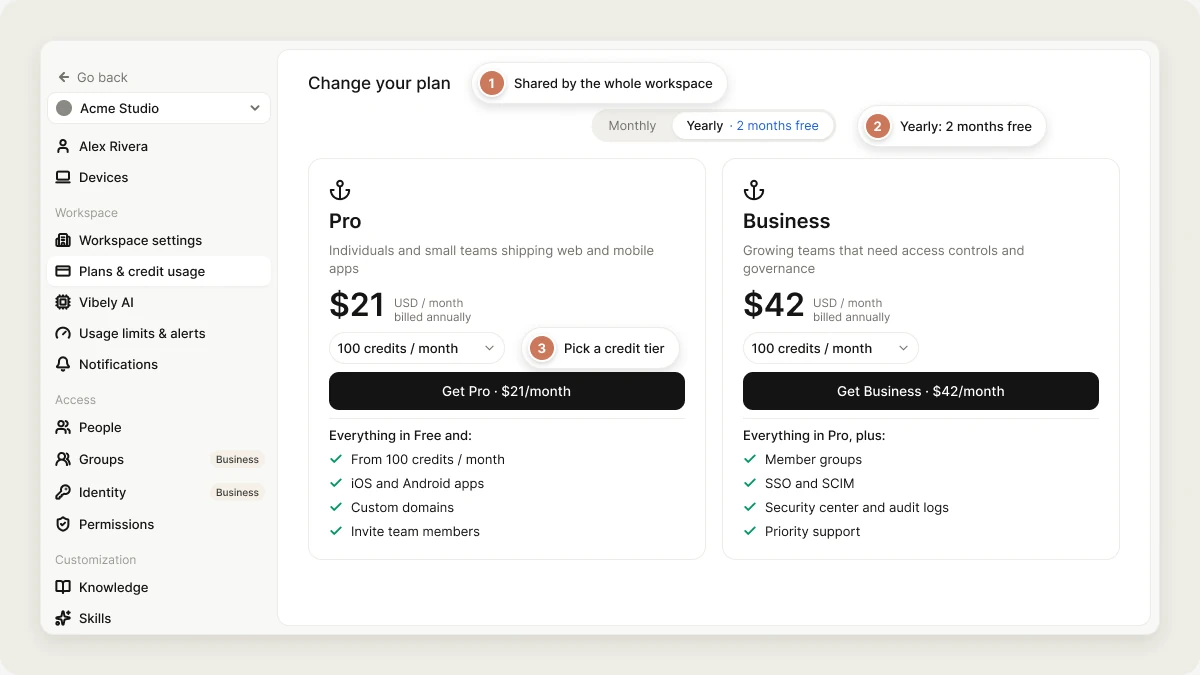 Open **Settings → Plans & credit usage** to upgrade, buy credits, see invoices, or cancel. See [Manage your subscription](#manage-your-subscription).
For how credits work, what uses them, and top-ups, see [Credits and usage](/features/account/credits).
## Compare plans
| Plan | Price | Best for |
| - | - | - |
| **Free** | \$0 | Trying Vibely and building web apps on your own |
| **Pro** | From \$25 / month (100 credits) | Individuals and small teams shipping web and mobile apps |
| **Business** | From \$50 / month (100 credits) | Growing teams that need access controls and governance |
| **Enterprise** | Custom, on a signed order | Large organizations with procurement, invoicing, and support needs |
All prices are in US dollars.
### Credits and usage
| Feature | Free | Pro | Business | Enterprise |
| - | - | - | - | - |
| Daily credits | 5 a day | 5 a day | 5 a day | 5 a day |
| Monthly credits | 5 | 100, 200, 400 or 800 | 100, 200, 400 or 800 | Set on your order |
| Unused credits roll over | — | Yes | Yes | Per order |
| Buy extra credits (top-ups, at the plan rate) | — | \$5 per 20 | \$10 per 20 | Per order |
| Auto top-up | — | Yes | Yes | Per order |
| Default monthly credit limit per member | — | Yes | Yes | Yes |
| Individual credit limits per member | — | — | Yes | Yes |
### Building and publishing
| Feature | Free | Pro | Business | Enterprise |
| - | - | - | - | - |
| Web apps | Yes | Yes | Yes | Yes |
| Unlimited projects | Yes | Yes | Yes | Yes |
| Publish on a `vibelyagent.com` subdomain | Yes | Yes | Yes | Yes |
| iOS and Android apps | — | Yes | Yes | Yes |
| Publish to the App Store and Google Play | — | Yes | Yes | Yes |
| Custom domains | — | Yes | Yes | Yes |
| Branded workspace URLs | — | — | Yes | Yes |
| Restrict a published app to the workspace, groups, or yourself | — | — | Yes | Yes |
| Restricted projects (invited people only) | — | — | Yes | Yes |
| Workspace templates | — | — | Yes | Yes |
| Design systems | — | — | Yes | Yes |
| Workspace-shared connectors | — | — | Yes | Yes |
| Build secrets | — | — | — | Yes |
| Managed npm registry | — | — | — | Yes |
### Security and governance
| Feature | Free | Pro | Business | Enterprise |
| - | - | - | - | - |
| Invite team members | — | Yes | Yes | Yes |
| Roles and permissions | — | Yes | Yes | Yes |
| Member groups | — | — | Yes | Yes |
| Single sign-on (SAML 2.0 and OIDC) | — | — | Yes | Yes |
| SCIM provisioning | — | — | Yes | Yes |
| Security center and Workspace Insights | — | — | Yes | Yes |
| Scheduled security scans | — | — | Yes | Yes |
| Advanced privacy and security controls | — | — | Yes | Yes |
| Audit logs | — | — | Yes | Yes |
| AI training on your data | Off by default | Off by default | Off by default | Off by default |
### Support
| Feature | Free | Pro | Business | Enterprise |
| - | - | - | - | - |
| Community support | Yes | Yes | Yes | Yes |
| Email support | — | Yes | Yes | Yes |
| Priority support | — | — | Yes | Yes |
| Named support contacts with target response times | — | — | — | Yes |
## Compare subscription tiers
Pro and Business come in four monthly credit tiers. Choose the tier with **Adjust usage** when you pick a plan. Yearly billing charges ten months for twelve (**2 months free**).
### Pro tiers
| Monthly credits | Monthly billing | Yearly billing |
| - | - | - |
| 100 | \$25 | $250 ($21 / month) |
| 200 | \$50 | $500 ($42 / month) |
| 400 | \$100 | $1,000 ($83 / month) |
| 800 | \$200 | $2,000 ($167 / month) |
### Business tiers
| Monthly credits | Monthly billing | Yearly billing |
| - | - | - |
| 100 | \$50 | $500 ($42 / month) |
| 200 | \$100 | $1,000 ($83 / month) |
| 400 | \$200 | $2,000 ($167 / month) |
| 800 | \$400 | $4,000 ($333 / month) |
### Enterprise
Enterprise isn't a checkout. Seats, per-seat price, credit volume, and overage rate are set on a signed order, with annual invoicing in USD on net-30 terms and no card on file. It also includes named support contacts with target first-response times, a yearly security questionnaire, and a negotiated uptime commitment. See [Enterprise](/introduction/enterprise).
## Manage your subscription
Only the workspace **owner** can change billing, unless the owner grants **Manage billing** to other roles in **Settings → Permissions**. Everyone else can see the plan and credit balance.
### Upgrade your plan
Go to **Settings → Plans & credit usage** and click **Manage**, or scroll to **Change your plan**.
Choose **Pro** or **Business**, pick **Monthly** or **Yearly**, and choose a credit tier with **Adjust usage**.
Complete payment. Your new plan and its credits apply to the workspace as soon as payment succeeds.
### Change plan, tier, or billing cycle
To move a paid workspace to a different plan, credit tier, or billing cycle, pick the new one in **Settings → Plans & credit usage** and check out, the same way you upgrade. The checkout window notes that the new plan **replaces your current plan**.
As soon as the new payment succeeds, the new plan and its credits apply, and your previous subscription is cancelled immediately, so you're never billed for both. The unused part of the previous billing period isn't refunded or prorated.
### What stops working when you move to a lower plan
Features your new plan doesn't include lock, but nothing is deleted:
* Settings sections for those features show an upgrade screen instead of their controls.
* You can't create new mobile projects or add custom domains after leaving Pro or Business.
* On Free, you can't invite new members or buy extra credits.
* Your credit allowance changes to the new plan's amount at the next refresh.
### Manage invoices
Invoices appear under **Invoices** in **Settings → Plans & credit usage** after your first charge, each with a link to its PDF.
### Cancel your subscription
1. Go to **Settings → Plans & credit usage**.
2. Under **Cancellation**, click **Cancel**.
3. Tell us why you're leaving. Your answers help us improve Vibely.
4. Click **Confirm Cancellation & Submit Feedback**.
Your plan stays active until the end of the current billing period, and you get a confirmation email with the end date. After that, the workspace moves to Free.
If cancellation fails, your subscription is still active. Try again, or email [hello@vibely.sh](mailto:hello@vibely.sh) and we'll cancel it for you.
## FAQ
No. Pro and Business are priced by the credits they include. Add as many members as you like; they share the workspace's credits.
No. Each workspace has its own plan. Your first workspace can stay on Free; each additional workspace needs a paid plan.
US dollars only.
On Pro and Business, what's left at renewal rolls over for one more period. On Free, your balance is topped back up to 5 each month. See [Credits and usage](/features/account/credits).
No. Publishing, hosting, and mobile builds don't use credits. See [Credits and usage](/features/account/credits#what-uses-credits).
## Related
What a credit is and what uses one.
Contracts, invoicing, and support for large teams.
## Related topics
- [Credits and usage](/features/account/credits.md)
- [Vibely workspace](/features/workspace/overview.md)
- [Account settings](/features/account/settings.md)
- [Workspace admin settings](/features/workspace/admin-settings.md)
- [FAQ](/faq.md)
This documentation is built and hosted on [Mintlify](https://mintlify.com), a developer documentation platform.
Open **Settings → Plans & credit usage** to upgrade, buy credits, see invoices, or cancel. See [Manage your subscription](#manage-your-subscription).
For how credits work, what uses them, and top-ups, see [Credits and usage](/features/account/credits).
## Compare plans
| Plan | Price | Best for |
| - | - | - |
| **Free** | \$0 | Trying Vibely and building web apps on your own |
| **Pro** | From \$25 / month (100 credits) | Individuals and small teams shipping web and mobile apps |
| **Business** | From \$50 / month (100 credits) | Growing teams that need access controls and governance |
| **Enterprise** | Custom, on a signed order | Large organizations with procurement, invoicing, and support needs |
All prices are in US dollars.
### Credits and usage
| Feature | Free | Pro | Business | Enterprise |
| - | - | - | - | - |
| Daily credits | 5 a day | 5 a day | 5 a day | 5 a day |
| Monthly credits | 5 | 100, 200, 400 or 800 | 100, 200, 400 or 800 | Set on your order |
| Unused credits roll over | — | Yes | Yes | Per order |
| Buy extra credits (top-ups, at the plan rate) | — | \$5 per 20 | \$10 per 20 | Per order |
| Auto top-up | — | Yes | Yes | Per order |
| Default monthly credit limit per member | — | Yes | Yes | Yes |
| Individual credit limits per member | — | — | Yes | Yes |
### Building and publishing
| Feature | Free | Pro | Business | Enterprise |
| - | - | - | - | - |
| Web apps | Yes | Yes | Yes | Yes |
| Unlimited projects | Yes | Yes | Yes | Yes |
| Publish on a `vibelyagent.com` subdomain | Yes | Yes | Yes | Yes |
| iOS and Android apps | — | Yes | Yes | Yes |
| Publish to the App Store and Google Play | — | Yes | Yes | Yes |
| Custom domains | — | Yes | Yes | Yes |
| Branded workspace URLs | — | — | Yes | Yes |
| Restrict a published app to the workspace, groups, or yourself | — | — | Yes | Yes |
| Restricted projects (invited people only) | — | — | Yes | Yes |
| Workspace templates | — | — | Yes | Yes |
| Design systems | — | — | Yes | Yes |
| Workspace-shared connectors | — | — | Yes | Yes |
| Build secrets | — | — | — | Yes |
| Managed npm registry | — | — | — | Yes |
### Security and governance
| Feature | Free | Pro | Business | Enterprise |
| - | - | - | - | - |
| Invite team members | — | Yes | Yes | Yes |
| Roles and permissions | — | Yes | Yes | Yes |
| Member groups | — | — | Yes | Yes |
| Single sign-on (SAML 2.0 and OIDC) | — | — | Yes | Yes |
| SCIM provisioning | — | — | Yes | Yes |
| Security center and Workspace Insights | — | — | Yes | Yes |
| Scheduled security scans | — | — | Yes | Yes |
| Advanced privacy and security controls | — | — | Yes | Yes |
| Audit logs | — | — | Yes | Yes |
| AI training on your data | Off by default | Off by default | Off by default | Off by default |
### Support
| Feature | Free | Pro | Business | Enterprise |
| - | - | - | - | - |
| Community support | Yes | Yes | Yes | Yes |
| Email support | — | Yes | Yes | Yes |
| Priority support | — | — | Yes | Yes |
| Named support contacts with target response times | — | — | — | Yes |
## Compare subscription tiers
Pro and Business come in four monthly credit tiers. Choose the tier with **Adjust usage** when you pick a plan. Yearly billing charges ten months for twelve (**2 months free**).
### Pro tiers
| Monthly credits | Monthly billing | Yearly billing |
| - | - | - |
| 100 | \$25 | $250 ($21 / month) |
| 200 | \$50 | $500 ($42 / month) |
| 400 | \$100 | $1,000 ($83 / month) |
| 800 | \$200 | $2,000 ($167 / month) |
### Business tiers
| Monthly credits | Monthly billing | Yearly billing |
| - | - | - |
| 100 | \$50 | $500 ($42 / month) |
| 200 | \$100 | $1,000 ($83 / month) |
| 400 | \$200 | $2,000 ($167 / month) |
| 800 | \$400 | $4,000 ($333 / month) |
### Enterprise
Enterprise isn't a checkout. Seats, per-seat price, credit volume, and overage rate are set on a signed order, with annual invoicing in USD on net-30 terms and no card on file. It also includes named support contacts with target first-response times, a yearly security questionnaire, and a negotiated uptime commitment. See [Enterprise](/introduction/enterprise).
## Manage your subscription
Only the workspace **owner** can change billing, unless the owner grants **Manage billing** to other roles in **Settings → Permissions**. Everyone else can see the plan and credit balance.
### Upgrade your plan
Go to **Settings → Plans & credit usage** and click **Manage**, or scroll to **Change your plan**.
Choose **Pro** or **Business**, pick **Monthly** or **Yearly**, and choose a credit tier with **Adjust usage**.
Complete payment. Your new plan and its credits apply to the workspace as soon as payment succeeds.
### Change plan, tier, or billing cycle
To move a paid workspace to a different plan, credit tier, or billing cycle, pick the new one in **Settings → Plans & credit usage** and check out, the same way you upgrade. The checkout window notes that the new plan **replaces your current plan**.
As soon as the new payment succeeds, the new plan and its credits apply, and your previous subscription is cancelled immediately, so you're never billed for both. The unused part of the previous billing period isn't refunded or prorated.
### What stops working when you move to a lower plan
Features your new plan doesn't include lock, but nothing is deleted:
* Settings sections for those features show an upgrade screen instead of their controls.
* You can't create new mobile projects or add custom domains after leaving Pro or Business.
* On Free, you can't invite new members or buy extra credits.
* Your credit allowance changes to the new plan's amount at the next refresh.
### Manage invoices
Invoices appear under **Invoices** in **Settings → Plans & credit usage** after your first charge, each with a link to its PDF.
### Cancel your subscription
1. Go to **Settings → Plans & credit usage**.
2. Under **Cancellation**, click **Cancel**.
3. Tell us why you're leaving. Your answers help us improve Vibely.
4. Click **Confirm Cancellation & Submit Feedback**.
Your plan stays active until the end of the current billing period, and you get a confirmation email with the end date. After that, the workspace moves to Free.
If cancellation fails, your subscription is still active. Try again, or email [hello@vibely.sh](mailto:hello@vibely.sh) and we'll cancel it for you.
## FAQ
No. Pro and Business are priced by the credits they include. Add as many members as you like; they share the workspace's credits.
No. Each workspace has its own plan. Your first workspace can stay on Free; each additional workspace needs a paid plan.
US dollars only.
On Pro and Business, what's left at renewal rolls over for one more period. On Free, your balance is topped back up to 5 each month. See [Credits and usage](/features/account/credits).
No. Publishing, hosting, and mobile builds don't use credits. See [Credits and usage](/features/account/credits#what-uses-credits).
## Related
What a credit is and what uses one.
Contracts, invoicing, and support for large teams.
## Related topics
- [Credits and usage](/features/account/credits.md)
- [Vibely workspace](/features/workspace/overview.md)
- [Account settings](/features/account/settings.md)
- [Workspace admin settings](/features/workspace/admin-settings.md)
- [FAQ](/faq.md)
This documentation is built and hosted on [Mintlify](https://mintlify.com), a developer documentation platform.