> ## Documentation Index
> Fetch the complete documentation index at: https://docs.vibely.sh/docs/llms.txt
> Use this file to discover all available pages before exploring further.
# Workspace
> The top-level container for projects, members, billing, and connected accounts.
A workspace is the top-level container in Vibely. It holds projects, members, billing, and integrations. Most users have a single personal workspace; teams typically have one per product or per company.
 This page is the overview. For per-project settings, see [Project settings](/docs/workspace/project-settings). For roles and invites, see [People](/docs/workspace/people). For billing and admin controls, see [Admin settings](/docs/workspace/admin-settings).
## What lives in a workspace
| Lives in workspace | What it means |
| ---------------------------- | ---------------------------------------------------------------------------------------------------------------------------------------------------------------------- |
| **Projects** | Every Vibely build — Web App, Mobile App, or Vibely Design — belongs to exactly one workspace |
| **Members** | Invited collaborators with roles (Owner, Admin, Editor, Viewer). The **Admin** role is available on Pro and Business; Free workspaces only have Owner, Editor, Viewer. |
| **Member groups** (Business) | Named groups used for bulk project access grants |
| **Connected accounts** | GitHub, Supabase, Vercel, EAS — shared across every project in the workspace |
| **Connectors** | Slack, HubSpot, Google, Notion tokens — workspace-scoped OAuth / API keys |
| **Billing** | Plan, monthly credit grant, top-up history, invoices, per-member caps |
| **Workspace-wide settings** | Name, slug, logo, default visibility, SSO (Business), Security Center, Workspace Templates (Business) |
## Creating workspaces
Your **default** workspace is created free when you sign up. That one's on the house.
Any **additional** workspace is paid — creating one is a pay-then-create flow. The dialog asks for a name and slug, then the plan you want for that workspace (Pro or Business). You complete payment in **Razorpay** before the workspace exists; the server only creates the org after the charge confirms.
A few details worth knowing:
* Each workspace is its own billing unit. One workspace = one subscription. There is no "team billing" that spans workspaces.
* If you close the Razorpay window or the payment fails, nothing is created on the server. No half-finished org, no cleanup to do.
* Slug collisions are handled automatically with a suffix — the dialog tells you the final slug before you pay.
* On a successful payment the client switches you straight into the new workspace.
See [Plans and credits](/docs/introduction/plans-credits) for how the per-workspace subscription model affects credit grants and yearly billing.
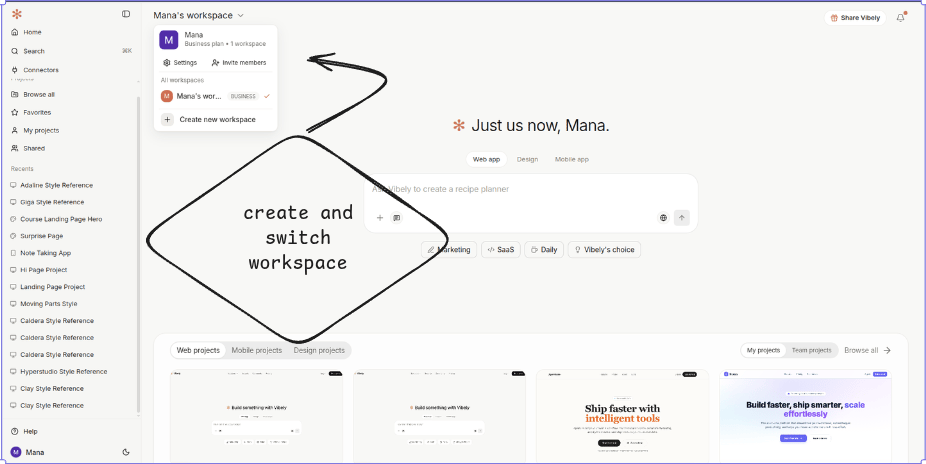
You can be a member of many workspaces. The switcher in the top-left lets you jump between them; everything (project list, connectors, billing) swaps to the new context instantly.
## Personal vs. team workspaces
The structure is the same; the difference is intent.
* **Personal workspace** — created automatically on sign-up. Just you, your projects, your billing. Most people stay here for solo work.
* **Team workspace** — you create it explicitly and invite people. Roles control who can do what. Billing is workspace-level, not per-member.
* **Client workspace** (agency pattern) — typically one workspace per client. The client pays (or you pay and bill them), you ship work, then transfer ownership at handoff.
## When to split workspaces
Splitting workspaces is cheap; merging them later is not. A few rules of thumb:
* **Different products** under the same umbrella usually belong in separate workspaces, especially if they have different stakeholders or budgets.
* **Personal vs. work** — keep weekend projects out of your company workspace. Tax records and project ownership get cleaner.
* **Client work** — one workspace per client lets you transfer ownership at handoff without exporting / importing anything.
When in doubt, start with one workspace and split later. Splitting an active workspace requires transferring projects one by one; doing it before you have ten projects is much easier.
## Switching workspaces
The workspace picker in the top-left shows everything you have access to. Switching is instant — the project list, connectors, member list, and billing all swap to the new context.
Each workspace remembers its own last-opened project, so coming back doesn't lose where you were.
## Renaming or deleting a workspace
Admins can rename the workspace and update its slug from **Settings → General**. Slug changes update share URLs immediately; old URLs stop resolving, so plan the rename when you're not mid-handoff.
Deletion lives in the same panel under **Danger zone** and is owner-only. It cascades to every project, deploy, connector, and member access record — only the audit log of the deletion itself is preserved.
## Plan gating at a glance
| Feature | Free | Pro | Business |
| ----------------------------- | :--: | :-: | :------: |
| Multiple workspaces | — | ✓ | ✓ |
| Team seats + Admin role | — | ✓ | ✓ |
| Custom subdomain on deploys | — | ✓ | ✓ |
| Custom domains | — | ✓ | ✓ |
| Workspace templates | — | — | ✓ |
| Member groups + group grants | — | — | ✓ |
| Security Center | — | — | ✓ |
| SSO (SAML / OIDC) | — | — | ✓ |
| MCP / Chat connector policy | — | — | ✓ |
| Domain-restricted invitations | — | — | ✓ |
| Branded subdomain | — | — | ✓ |
See [Plans and credits](/docs/introduction/plans-credits) for pricing and credit grants.
## Next
Invite members, assign roles, and manage access.
Per-project configuration: collaborators, GitHub, secrets, model pinning.
Billing, connected accounts, security policies, Security Center.
Account-level personalization that follows you across workspaces.
This page is the overview. For per-project settings, see [Project settings](/docs/workspace/project-settings). For roles and invites, see [People](/docs/workspace/people). For billing and admin controls, see [Admin settings](/docs/workspace/admin-settings).
## What lives in a workspace
| Lives in workspace | What it means |
| ---------------------------- | ---------------------------------------------------------------------------------------------------------------------------------------------------------------------- |
| **Projects** | Every Vibely build — Web App, Mobile App, or Vibely Design — belongs to exactly one workspace |
| **Members** | Invited collaborators with roles (Owner, Admin, Editor, Viewer). The **Admin** role is available on Pro and Business; Free workspaces only have Owner, Editor, Viewer. |
| **Member groups** (Business) | Named groups used for bulk project access grants |
| **Connected accounts** | GitHub, Supabase, Vercel, EAS — shared across every project in the workspace |
| **Connectors** | Slack, HubSpot, Google, Notion tokens — workspace-scoped OAuth / API keys |
| **Billing** | Plan, monthly credit grant, top-up history, invoices, per-member caps |
| **Workspace-wide settings** | Name, slug, logo, default visibility, SSO (Business), Security Center, Workspace Templates (Business) |
## Creating workspaces
Your **default** workspace is created free when you sign up. That one's on the house.
Any **additional** workspace is paid — creating one is a pay-then-create flow. The dialog asks for a name and slug, then the plan you want for that workspace (Pro or Business). You complete payment in **Razorpay** before the workspace exists; the server only creates the org after the charge confirms.
A few details worth knowing:
* Each workspace is its own billing unit. One workspace = one subscription. There is no "team billing" that spans workspaces.
* If you close the Razorpay window or the payment fails, nothing is created on the server. No half-finished org, no cleanup to do.
* Slug collisions are handled automatically with a suffix — the dialog tells you the final slug before you pay.
* On a successful payment the client switches you straight into the new workspace.
See [Plans and credits](/docs/introduction/plans-credits) for how the per-workspace subscription model affects credit grants and yearly billing.
You can be a member of many workspaces. The switcher in the top-left lets you jump between them; everything (project list, connectors, billing) swaps to the new context instantly.
## Personal vs. team workspaces
The structure is the same; the difference is intent.
* **Personal workspace** — created automatically on sign-up. Just you, your projects, your billing. Most people stay here for solo work.
* **Team workspace** — you create it explicitly and invite people. Roles control who can do what. Billing is workspace-level, not per-member.
* **Client workspace** (agency pattern) — typically one workspace per client. The client pays (or you pay and bill them), you ship work, then transfer ownership at handoff.
## When to split workspaces
Splitting workspaces is cheap; merging them later is not. A few rules of thumb:
* **Different products** under the same umbrella usually belong in separate workspaces, especially if they have different stakeholders or budgets.
* **Personal vs. work** — keep weekend projects out of your company workspace. Tax records and project ownership get cleaner.
* **Client work** — one workspace per client lets you transfer ownership at handoff without exporting / importing anything.
When in doubt, start with one workspace and split later. Splitting an active workspace requires transferring projects one by one; doing it before you have ten projects is much easier.
## Switching workspaces
The workspace picker in the top-left shows everything you have access to. Switching is instant — the project list, connectors, member list, and billing all swap to the new context.
Each workspace remembers its own last-opened project, so coming back doesn't lose where you were.
## Renaming or deleting a workspace
Admins can rename the workspace and update its slug from **Settings → General**. Slug changes update share URLs immediately; old URLs stop resolving, so plan the rename when you're not mid-handoff.
Deletion lives in the same panel under **Danger zone** and is owner-only. It cascades to every project, deploy, connector, and member access record — only the audit log of the deletion itself is preserved.
## Plan gating at a glance
| Feature | Free | Pro | Business |
| ----------------------------- | :--: | :-: | :------: |
| Multiple workspaces | — | ✓ | ✓ |
| Team seats + Admin role | — | ✓ | ✓ |
| Custom subdomain on deploys | — | ✓ | ✓ |
| Custom domains | — | ✓ | ✓ |
| Workspace templates | — | — | ✓ |
| Member groups + group grants | — | — | ✓ |
| Security Center | — | — | ✓ |
| SSO (SAML / OIDC) | — | — | ✓ |
| MCP / Chat connector policy | — | — | ✓ |
| Domain-restricted invitations | — | — | ✓ |
| Branded subdomain | — | — | ✓ |
See [Plans and credits](/docs/introduction/plans-credits) for pricing and credit grants.
## Next
Invite members, assign roles, and manage access.
Per-project configuration: collaborators, GitHub, secrets, model pinning.
Billing, connected accounts, security policies, Security Center.
Account-level personalization that follows you across workspaces.