> ## Documentation Index
> Fetch the complete documentation index at: https://docs.vibely.sh/docs/llms.txt
> Use this file to discover all available pages before exploring further.
# Publish
> Take your web app live — a stable URL, your own domain, access controls, and instant rollback if anything breaks.
Every project gets a live preview URL the moment its dev environment is ready. Publishing turns that preview into something stable you can share with real users — at a branded `*.vibelyagent.com` URL, your own custom domain, or both.
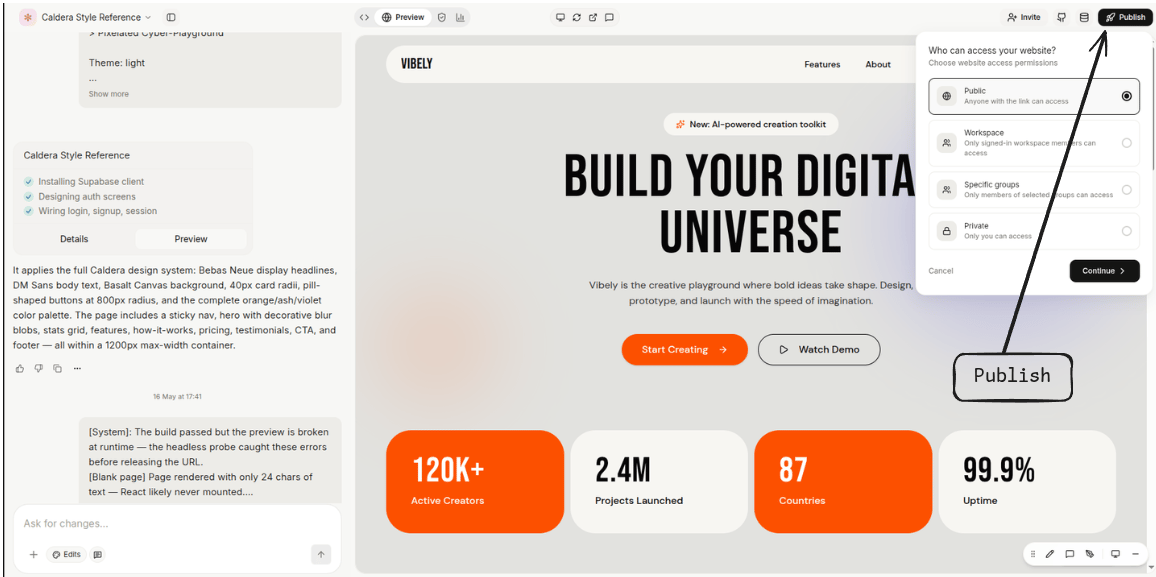 This page is the feature tour for everything you can do once you click **Publish**.
## Preview vs published
Two URLs coexist for every project.
| Property | Preview | Published |
| ---------------- | -------------------------------------------- | ------------------------------------------------ |
| URL | `.vibelyagent.com` | `.vibelyagent.com` or your own domain |
| Stability | Rotates if the project restarts | Stable across restarts |
| Auth | Owner + invited collaborators | Public by default (or restricted — see below) |
| Refresh on edits | Instant — hot-reloads as the agent writes | After re-publish |
| Best for | Active development, iteration with the agent | Real users, your portfolio, stakeholders |
The preview URL is for development. For users, always publish.
## Publishing
**Project menu → Publish.** Pick a slug, click **Publish**. Vibely builds the app, deploys it to the edge, and your URL goes live in under 30 seconds.
Re-publish to push changes. Each publish creates a new version; previous versions stay around so you can roll back instantly if something breaks.
## Features
### Branded `*.vibelyagent.com` URL
Every project gets a free `.vibelyagent.com`. The slug is global (first-come, first-served) but you can change it any time — the previous slug becomes available to others within 30 days.
Good for: shipping a portfolio piece, sharing a demo, hosting a side project you don't want to pay for a domain on.
### Custom domain
To serve at `app.example.com`:
Project menu → **Domains** → **Add domain**.
Vibely shows you a `CNAME` record to add at your registrar. Pointing `app.example.com` → `cname.vibelyagent.com` is the typical setup. For an apex domain (`example.com`), use `ALIAS` / `ANAME` if your provider supports it; otherwise, redirect apex → [www](http://www).
Click **Verify**. Vibely checks the DNS, provisions a TLS certificate via Let's Encrypt, and switches your published URL to the custom domain. Provisioning typically completes in \<2 minutes.
If verification fails, the most common causes are:
* DNS hasn't propagated yet — wait 5 minutes and retry
* An existing `A` / `AAAA` record at the same name — remove it first
* Cloudflare proxying enabled on your registrar — disable the orange cloud (Vibely provisions its own cert at the edge)
Multiple custom domains per project are supported — useful for staging vs. production, or marketing site vs. app.
### Access controls
Restrict who can load your published URL. Enforced at the edge, before traffic reaches your app.
| Mode | Who can load the URL | Plan |
| -------------------- | ------------------------------------------------- | -------- |
| **Public** (default) | Anyone with the URL | All |
| **Workspace-only** | Only signed-in members of the project's workspace | Business |
| **Group-only** | Only members of selected workspace groups | Business |
Switch modes any time from **Project menu → Publish → Access**. Changes take effect immediately.
### Access requests
When a project is restricted (workspace-only or group-only), visitors who aren't on the list see a request-access screen instead of a 404. They submit a short note; project owners and admins see the request in the project's settings panel and approve or decline from there.
This is the path most teams use to onboard a new collaborator onto a published app without inviting them to the whole workspace first.
### Iframe embedding
Published apps work as iframes anywhere by default — Notion, Webflow, slides, your portfolio. No frame-blocking headers in the way.
If you'd rather *not* be embeddable on a custom domain (common for production apps with sensitive flows), toggle **Frame-Options → Same-origin only** in domain settings.
### Version history & rollback
Every publish creates a versioned build. The project's **Versions** tab lists them with timestamp, slug, and a one-line note of what changed.
Click any previous version → **Restore** to roll back. The URL points at the older build within seconds; no rebuild needed. Roll forward the same way.
Good for: catching a broken release, A/B comparing two designs at the same URL, restoring after an accidental delete.
### Export to GitHub
**Project menu → Export → GitHub.** Pick a repo (or let Vibely create one), and the project is committed as a normal Vite + React project.
* `bun install && bun dev` works locally without Vibely
* Re-import via **Connect GitHub** to keep the project in sync both ways
* Code is yours — no proprietary runtime, no special build step, nothing that ties the codebase to Vibely once it's out
### Hosting elsewhere
The build output is a static `dist/` directory. Drop it on any static host:
* **Vercel / Netlify / Cloudflare Pages** — connect the GitHub repo, point at `bun run build`, deploy
* **S3 + CloudFront / Bunny / Fastly** — upload `dist/` and point your CDN at it
* **Your own server** — `npx serve dist` or any static file server
If your app uses Supabase, Stripe, Resend, etc., those continue to work the same way — they're just env vars set at the host level.
### Auto-publish from GitHub
Once GitHub is connected, every push to `main` (configurable) can auto-publish to a chosen domain. Useful when you've graduated from "prompt-driven iteration" to "team of developers editing the codebase directly."
Toggle in **Project menu → Publish → Auto-publish**.
## Limits
* Free `*.vibelyagent.com` URLs are best for demos and side projects; for branded production, custom domains are the way.
* Static hosting only on Vibely's side — for serverless functions, use Supabase Edge Functions or Inngest via [Connectors](/docs/connectors/overview).
* Access control modes are mutually exclusive — pick whichever scope you need. Workspace-only and group-only require Business.
This page is the feature tour for everything you can do once you click **Publish**.
## Preview vs published
Two URLs coexist for every project.
| Property | Preview | Published |
| ---------------- | -------------------------------------------- | ------------------------------------------------ |
| URL | `.vibelyagent.com` | `.vibelyagent.com` or your own domain |
| Stability | Rotates if the project restarts | Stable across restarts |
| Auth | Owner + invited collaborators | Public by default (or restricted — see below) |
| Refresh on edits | Instant — hot-reloads as the agent writes | After re-publish |
| Best for | Active development, iteration with the agent | Real users, your portfolio, stakeholders |
The preview URL is for development. For users, always publish.
## Publishing
**Project menu → Publish.** Pick a slug, click **Publish**. Vibely builds the app, deploys it to the edge, and your URL goes live in under 30 seconds.
Re-publish to push changes. Each publish creates a new version; previous versions stay around so you can roll back instantly if something breaks.
## Features
### Branded `*.vibelyagent.com` URL
Every project gets a free `.vibelyagent.com`. The slug is global (first-come, first-served) but you can change it any time — the previous slug becomes available to others within 30 days.
Good for: shipping a portfolio piece, sharing a demo, hosting a side project you don't want to pay for a domain on.
### Custom domain
To serve at `app.example.com`:
Project menu → **Domains** → **Add domain**.
Vibely shows you a `CNAME` record to add at your registrar. Pointing `app.example.com` → `cname.vibelyagent.com` is the typical setup. For an apex domain (`example.com`), use `ALIAS` / `ANAME` if your provider supports it; otherwise, redirect apex → [www](http://www).
Click **Verify**. Vibely checks the DNS, provisions a TLS certificate via Let's Encrypt, and switches your published URL to the custom domain. Provisioning typically completes in \<2 minutes.
If verification fails, the most common causes are:
* DNS hasn't propagated yet — wait 5 minutes and retry
* An existing `A` / `AAAA` record at the same name — remove it first
* Cloudflare proxying enabled on your registrar — disable the orange cloud (Vibely provisions its own cert at the edge)
Multiple custom domains per project are supported — useful for staging vs. production, or marketing site vs. app.
### Access controls
Restrict who can load your published URL. Enforced at the edge, before traffic reaches your app.
| Mode | Who can load the URL | Plan |
| -------------------- | ------------------------------------------------- | -------- |
| **Public** (default) | Anyone with the URL | All |
| **Workspace-only** | Only signed-in members of the project's workspace | Business |
| **Group-only** | Only members of selected workspace groups | Business |
Switch modes any time from **Project menu → Publish → Access**. Changes take effect immediately.
### Access requests
When a project is restricted (workspace-only or group-only), visitors who aren't on the list see a request-access screen instead of a 404. They submit a short note; project owners and admins see the request in the project's settings panel and approve or decline from there.
This is the path most teams use to onboard a new collaborator onto a published app without inviting them to the whole workspace first.
### Iframe embedding
Published apps work as iframes anywhere by default — Notion, Webflow, slides, your portfolio. No frame-blocking headers in the way.
If you'd rather *not* be embeddable on a custom domain (common for production apps with sensitive flows), toggle **Frame-Options → Same-origin only** in domain settings.
### Version history & rollback
Every publish creates a versioned build. The project's **Versions** tab lists them with timestamp, slug, and a one-line note of what changed.
Click any previous version → **Restore** to roll back. The URL points at the older build within seconds; no rebuild needed. Roll forward the same way.
Good for: catching a broken release, A/B comparing two designs at the same URL, restoring after an accidental delete.
### Export to GitHub
**Project menu → Export → GitHub.** Pick a repo (or let Vibely create one), and the project is committed as a normal Vite + React project.
* `bun install && bun dev` works locally without Vibely
* Re-import via **Connect GitHub** to keep the project in sync both ways
* Code is yours — no proprietary runtime, no special build step, nothing that ties the codebase to Vibely once it's out
### Hosting elsewhere
The build output is a static `dist/` directory. Drop it on any static host:
* **Vercel / Netlify / Cloudflare Pages** — connect the GitHub repo, point at `bun run build`, deploy
* **S3 + CloudFront / Bunny / Fastly** — upload `dist/` and point your CDN at it
* **Your own server** — `npx serve dist` or any static file server
If your app uses Supabase, Stripe, Resend, etc., those continue to work the same way — they're just env vars set at the host level.
### Auto-publish from GitHub
Once GitHub is connected, every push to `main` (configurable) can auto-publish to a chosen domain. Useful when you've graduated from "prompt-driven iteration" to "team of developers editing the codebase directly."
Toggle in **Project menu → Publish → Auto-publish**.
## Limits
* Free `*.vibelyagent.com` URLs are best for demos and side projects; for branded production, custom domains are the way.
* Static hosting only on Vibely's side — for serverless functions, use Supabase Edge Functions or Inngest via [Connectors](/docs/connectors/overview).
* Access control modes are mutually exclusive — pick whichever scope you need. Workspace-only and group-only require Business.