> ## Documentation Index
> Fetch the complete documentation index at: https://docs.vibely.sh/docs/llms.txt
> Use this file to discover all available pages before exploring further.
# Mobile App Mode
> Native iOS and Android apps from one prompt. Preview in your browser, test on your phone, ship to the store.
Mobile App Mode builds real native iOS and Android apps from one prompt — preview in your browser, test on your phone, ship to the store. The same codebase ships to both platforms, no Mac required.
 Build your first mobile app in under 10 minutes.
The stack and starter setup every mobile app ships with.
Camera, push, biometrics, geolocation, in-app purchases, deep links.
EAS builds, TestFlight, Play Console — all driven by Vibely.
## The flow
1. **Pick Mobile App** on the new-project screen.
2. **Describe what you want.** *"A habit tracker — daily streaks, push reminders at user-chosen times, biometric unlock, Supabase auth."*
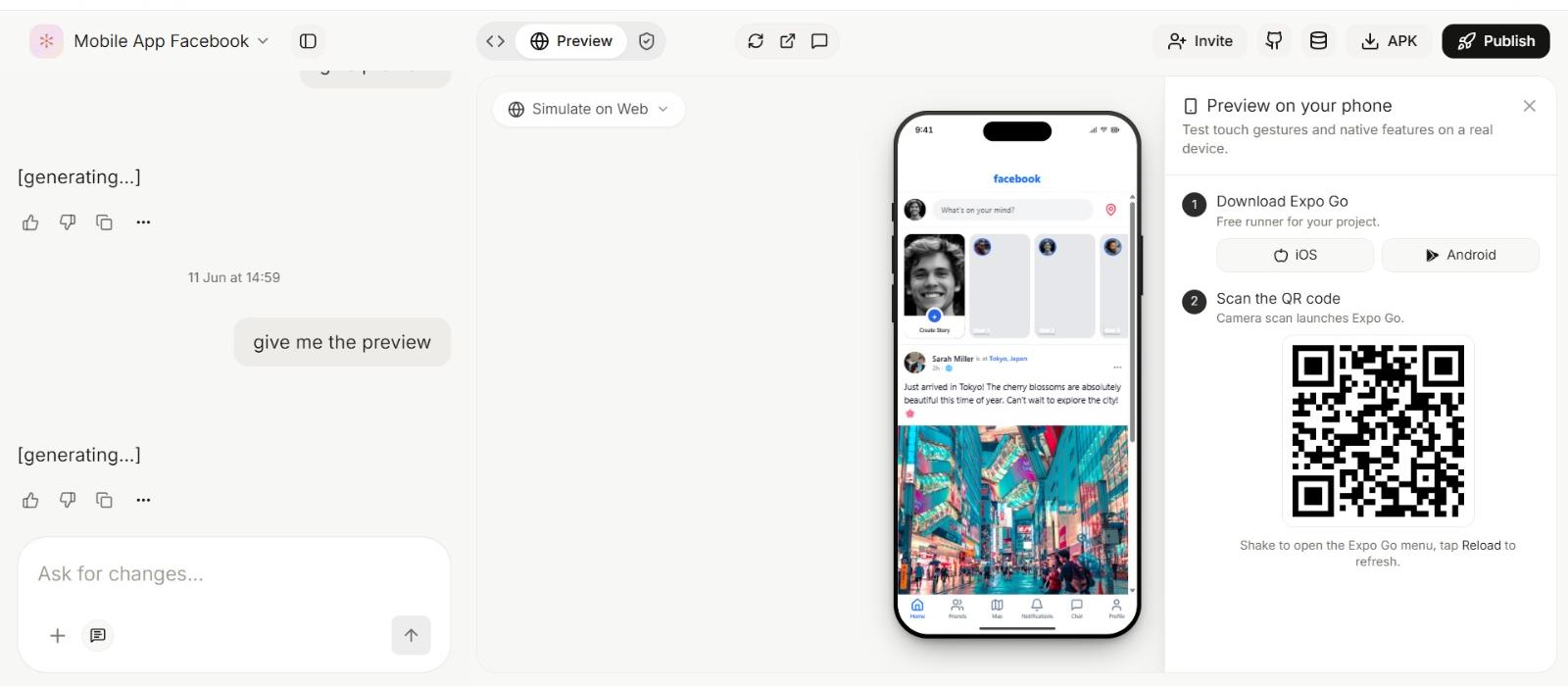
3. **Web preview appears in seconds.** Tap around, check the layout — instant feedback.
4. **Scan the QR with [Expo Go](https://expo.dev/go)** on your iPhone or Android. The same app loads on your device with hot reload. Required for testing camera, push, biometrics, and other native APIs.
Build your first mobile app in under 10 minutes.
The stack and starter setup every mobile app ships with.
Camera, push, biometrics, geolocation, in-app purchases, deep links.
EAS builds, TestFlight, Play Console — all driven by Vibely.
## The flow
1. **Pick Mobile App** on the new-project screen.
2. **Describe what you want.** *"A habit tracker — daily streaks, push reminders at user-chosen times, biometric unlock, Supabase auth."*
3. **Web preview appears in seconds.** Tap around, check the layout — instant feedback.
4. **Scan the QR with [Expo Go](https://expo.dev/go)** on your iPhone or Android. The same app loads on your device with hot reload. Required for testing camera, push, biometrics, and other native APIs.
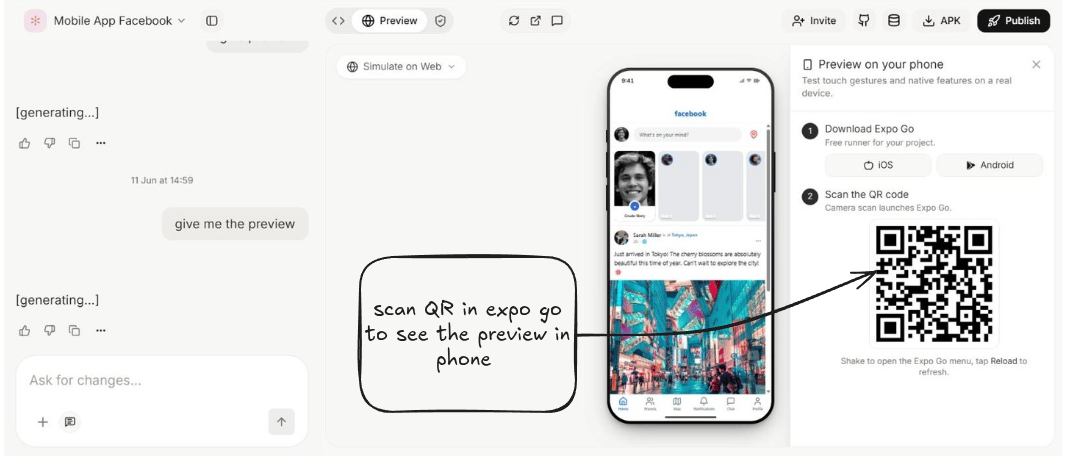 5. **Iterate.** Both web preview and on-device app refresh together every turn.
6. **Ship.** Vibely drives EAS to build, sign, and upload to TestFlight (iOS) and Play Console (Android). EAS builds in the cloud — no Mac needed.
## Prompt inputs
A text prompt is the minimum — but the composer also lets you attach references and starting code so the first build lands closer to what you want.
* **Reference URL** — paste a link to an app's landing page, a competitor's design, or any site whose layout / tone you want as inspiration.
* **Image / file upload** — drop in a screenshot, mockup, mood board, logo, or PDF. The agent reads it and matches the style or content.
* **DESIGN.md upload** — bring in an existing [DESIGN.md](/docs/design/design-md) and the app generates against your colors, typography, spacing, and component patterns.
* **Import from Design Mode** — if you came from a [Design Mode app prototype → Make it real](/docs/design/overview), the chosen design lands as your starting code; the build agent picks up the design tokens automatically.
* **GitHub import** — connect an existing Expo / React Native repo and Vibely clones it as the starting point. The agent edits the existing codebase instead of scaffolding fresh.
* **Color palette** — pick or paste a palette; the generated app uses it instead of inventing one.
* **Platform** — iOS, Android, or both. Vibely defaults to both; pick one if you want platform-specific conventions (iOS-only haptics, Material-only ripples) to dominate.
* **App icon & splash** — upload an icon and splash image and they're wired into `app.json` for both platforms; otherwise Vibely generates ones that match your palette.
* **Connectors** — mention any service by name in the prompt (Supabase, Stripe, Resend, RevenueCat, etc.) and the agent wires it in. See [Connectors](/docs/connectors/overview).
## What you can build
* **Productivity & habit apps** — trackers, journals, planners
* **Content apps** — feeds, podcasts, video, news
* **Social** — auth, profiles, follow/unfollow, real-time chat
* **Marketplaces** — listings, search, in-app purchases, reviews
* **Fitness & health** — workout tracking, geolocation, biometric gating
* **AI-powered apps** — on-device camera + cloud inference
## What you can't (yet)
* **Custom native modules** outside the Expo SDK require a custom EAS development build (one-time setup; everything still hot-reloads after).
* **Some payment SDKs** require the same custom build — RevenueCat works in Expo Go; bare native does not.
* **App Clips and widgets** require a custom build and additional configuration.
* **Some native APIs in the web preview** — camera, push, biometrics, secure storage. Switch to Expo Go for those.
## What you'll need to ship
The only hard prerequisites for the App Store and Play Store.
* **Apple Developer Program** — **\$99 / year** for iOS publishing.
* **Google Play Console** — **\$25 one-time** for Android publishing.
* **A free Expo account** — for EAS builds. Free tier is enough to start.
Everything else (signing certificates, provisioning, store metadata workflow) is driven by Vibely. See [Ship to stores](/docs/mobile-app/ship).
## When to use Mobile App Mode vs. other modes
| Use it for | Use a different mode for |
| --------------------------------------- | --------------------------------------------------------- |
| Native iOS / Android with shared code | Browser-only apps (use [Web App Mode](/docs/web-app/overview)) |
| Apps needing camera / push / biometrics | A landing site for your mobile app |
| Tablets + phone (responsive RN) | Pure UI mockups (use [Design Mode](/docs/design/overview)) |
| Apps you'll ship to the App Store | A purely web-based prototype |
**Pair with web.** The mobile app can share a Supabase backend, Stripe account, and Resend domain with a [Web App Mode](/docs/web-app/overview) project — same data, two surfaces.
5. **Iterate.** Both web preview and on-device app refresh together every turn.
6. **Ship.** Vibely drives EAS to build, sign, and upload to TestFlight (iOS) and Play Console (Android). EAS builds in the cloud — no Mac needed.
## Prompt inputs
A text prompt is the minimum — but the composer also lets you attach references and starting code so the first build lands closer to what you want.
* **Reference URL** — paste a link to an app's landing page, a competitor's design, or any site whose layout / tone you want as inspiration.
* **Image / file upload** — drop in a screenshot, mockup, mood board, logo, or PDF. The agent reads it and matches the style or content.
* **DESIGN.md upload** — bring in an existing [DESIGN.md](/docs/design/design-md) and the app generates against your colors, typography, spacing, and component patterns.
* **Import from Design Mode** — if you came from a [Design Mode app prototype → Make it real](/docs/design/overview), the chosen design lands as your starting code; the build agent picks up the design tokens automatically.
* **GitHub import** — connect an existing Expo / React Native repo and Vibely clones it as the starting point. The agent edits the existing codebase instead of scaffolding fresh.
* **Color palette** — pick or paste a palette; the generated app uses it instead of inventing one.
* **Platform** — iOS, Android, or both. Vibely defaults to both; pick one if you want platform-specific conventions (iOS-only haptics, Material-only ripples) to dominate.
* **App icon & splash** — upload an icon and splash image and they're wired into `app.json` for both platforms; otherwise Vibely generates ones that match your palette.
* **Connectors** — mention any service by name in the prompt (Supabase, Stripe, Resend, RevenueCat, etc.) and the agent wires it in. See [Connectors](/docs/connectors/overview).
## What you can build
* **Productivity & habit apps** — trackers, journals, planners
* **Content apps** — feeds, podcasts, video, news
* **Social** — auth, profiles, follow/unfollow, real-time chat
* **Marketplaces** — listings, search, in-app purchases, reviews
* **Fitness & health** — workout tracking, geolocation, biometric gating
* **AI-powered apps** — on-device camera + cloud inference
## What you can't (yet)
* **Custom native modules** outside the Expo SDK require a custom EAS development build (one-time setup; everything still hot-reloads after).
* **Some payment SDKs** require the same custom build — RevenueCat works in Expo Go; bare native does not.
* **App Clips and widgets** require a custom build and additional configuration.
* **Some native APIs in the web preview** — camera, push, biometrics, secure storage. Switch to Expo Go for those.
## What you'll need to ship
The only hard prerequisites for the App Store and Play Store.
* **Apple Developer Program** — **\$99 / year** for iOS publishing.
* **Google Play Console** — **\$25 one-time** for Android publishing.
* **A free Expo account** — for EAS builds. Free tier is enough to start.
Everything else (signing certificates, provisioning, store metadata workflow) is driven by Vibely. See [Ship to stores](/docs/mobile-app/ship).
## When to use Mobile App Mode vs. other modes
| Use it for | Use a different mode for |
| --------------------------------------- | --------------------------------------------------------- |
| Native iOS / Android with shared code | Browser-only apps (use [Web App Mode](/docs/web-app/overview)) |
| Apps needing camera / push / biometrics | A landing site for your mobile app |
| Tablets + phone (responsive RN) | Pure UI mockups (use [Design Mode](/docs/design/overview)) |
| Apps you'll ship to the App Store | A purely web-based prototype |
**Pair with web.** The mobile app can share a Supabase backend, Stripe account, and Resend domain with a [Web App Mode](/docs/web-app/overview) project — same data, two surfaces.