> ## Documentation Index
> Fetch the complete documentation index at: https://docs.vibely.sh/docs/llms.txt
> Use this file to discover all available pages before exploring further.
# Plans and credits
> What each plan includes, how credits work, and how billing is handled.
Vibely uses a credit-based model so you only pay for what you actually use. A credit is roughly the cost of one agent turn — model calls plus the tools that turn invokes. The plans differ in monthly grants, who pays, and which advanced surfaces (mobile, design, SSO, audit) are unlocked.
For live pricing always check [vibely.sh/pricing](https://vibely.sh/pricing); this page covers the structure.
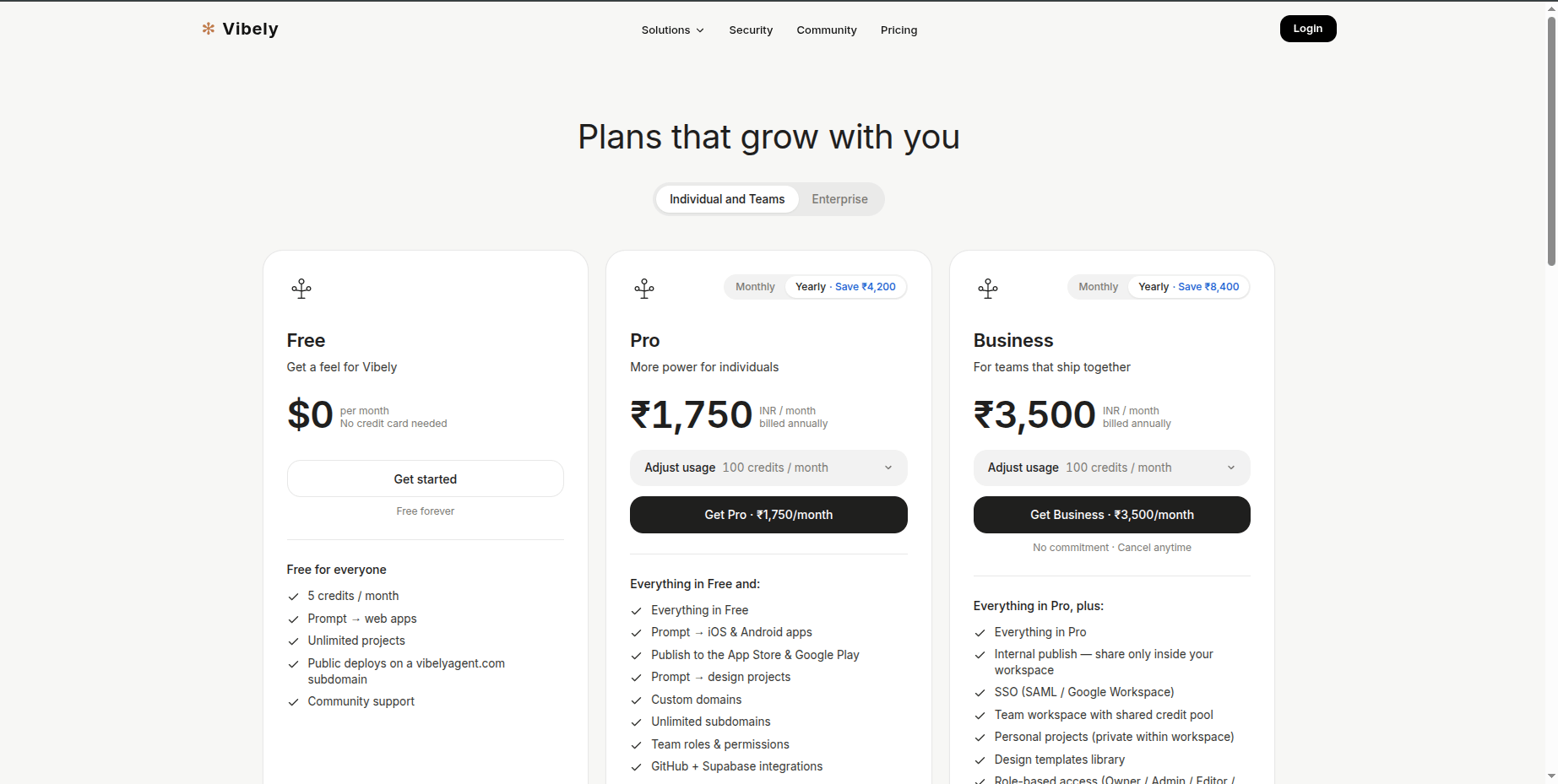 ## Plans
Three tiers, all month-to-month or annual.
### Free — \$0 / ₹0
For trying Vibely out, weekend builds, and learning the agent.
* **5 credits / month**, refreshed on your sign-up anniversary
* **1 seat** (personal use, no team invites)
* **100 builds / month** cap
* Public deploys on `vibelyagent.com`
* Unlimited projects, community support
* No rollover, no top-ups, no custom domains, no Mobile App Mode, no Design Mode, no third-party integrations
### Pro — \$25 / mo or ₹2,099 / mo
For individuals who ship regularly. Yearly: **\$250 / ₹20,999** (≈ 2 months free).
* **100 credits / month** with **1-month rollover**
* Unlimited builds, unlimited subdomains
* **Custom domains**
* **Prompt → iOS & Android apps** via Expo
* **Prompt → design projects** in Design Mode
* **GitHub + Supabase** connectors
* **Top-up credits** available
* Team roles & permissions (individual scope)
* Email support
### Business — \$50 / mo or ₹4,199 / mo
For teams that ship together. Yearly: **\$500 / ₹41,999** (≈ 2 months free). Everything in Pro, plus:
* **100 credits / month shared across the whole workspace** (one org pool, not per-user)
* Unlimited seats, unlimited builds
* **SSO** (SAML / Google Workspace)
* **Security Center**
* **Internal publish** — share apps only inside your workspace
* **Design templates library**
* **Personal projects** — Business-only. Marked Restricted to their creator by default and invisible to other workspace members until access is explicitly granted.
* **Role-based access**: Owner / Admin / Editor / Viewer
* Dedicated support
## Billing cycles & currency
* Choose **monthly** or **yearly** at checkout. Yearly is priced at \~10× the monthly rate, so two months are effectively free.
* **Yearly billing grants credits monthly, not annually.** You pay up front for the year and the credit grant lands on the same schedule a monthly subscription would — a fresh grant each billing month. This avoids the "I burned my entire year's credits in week one" problem.
* Currency is **auto-detected from your region** — India sees INR, the rest of the world sees USD.
* Payments are processed by **Razorpay** (cards, UPI, and all standard Indian methods). Tax / GST is handled per regional config and reflected on invoices.
## Per-workspace subscription
Each workspace is its own billing unit. Your default (free) workspace covers personal use. When you create an additional workspace, you pay for it during creation, and that workspace runs its own subscription — its own plan, its own credit pool, its own invoices.
There's no umbrella billing that spans workspaces. If you're on Pro for your day job and want Pro on a side project too, that's two subscriptions.
See [Workspace → Creating workspaces](/docs/workspace/overview#creating-workspaces) for the pay-then-create flow.
## Plan changes
* **Upgrade** — takes effect immediately. The new monthly credit grant is applied right away, and any existing rollover is preserved.
* **Downgrade or cancel** — takes effect at the **end of the current billing period**. You keep full access until then; at the period boundary your credit balance resets.
* **Cancel anytime** — no commitment. We may show a quick feedback prompt on cancel.
## Rate limits per plan
To keep service stable for everyone, request rates are capped per plan:
| | Free | Pro | Business |
| ---------------------- | :--: | :-: | :------: |
| LLM requests / minute | 10 | 60 | 200 |
| Admin actions / 15 min | 50 | 200 | 500 |
| General requests / min | 600 | 600 | 600 |
In normal use these are well above what a typical session needs; they only kick in for runaway scripts or abuse patterns.
***
## Credits
A credit is *roughly* the cost of one agent turn. Actual cost varies by mode, prompt size, and which tools the turn invokes.
### Monthly grant
| Plan | Grant | Resets on |
| -------- | -------------------------------------- | ----------------------------------- |
| Free | 5 credits | Sign-up anniversary |
| Pro | 100 credits | Your billing anniversary |
| Business | 100 credits, **shared across the org** | The workspace's billing anniversary |
***
## Top-ups (Pro & Business)
Buy one-time credit packs from **Workspace → Billing → Top-up** whenever you need extra headroom.
| Pack | Credits | INR | USD |
| ------ | ------- | ------- | ----- |
| Small | 50 | ₹1,249 | \$15 |
| Medium | 250 | ₹6,249 | \$75 |
| Large | 1,000 | ₹24,999 | \$300 |
**Validity:** rest of the current cycle + 1 month.
Top-ups stack with your monthly grant and rollover. Spend order: current-cycle balance → rollover → top-up balance.
***
## Zero balance and low-balance behaviour
Vibely shows a tiered warning so you're never surprised by depletion mid-build:
| Used | What you see |
| -------- | --------------------------------------------------------------------------- |
| ≥ 75 % | Muted bar, "X% used", **Upgrade Now** pill. Dismissable for the session. |
| ≥ 90 % | Amber bar, **Upgrade Now** pill. Still dismissable. |
| Depleted | Red bar, **Upgrade to continue** pill. Not dismissable — new turns blocked. |
You also get a **low-balance push notification** when your combined balance (current + rollover) drops below 20 credits, so you can top up before you're blocked.
Once you're out:
* Free users see "Upgrade to Pro to keep building."
* Paid users see "Buy a top-up or upgrade your plan."
Existing projects stay running and accessible — only **new agent turns** are blocked. Published apps and custom domains keep serving traffic. The meter is on agent compute, not on user traffic.
***
## Team & workspace billing
* **Free / Pro** — the subscription is tied to one user. Credits, top-ups, and invoices belong to that user.
* **Business** — the subscription is **org-level**. Every member draws from a **single shared 100-credit pool**, and seats are enforced at invite time (Editor and above count against the seat limit).
* The **workspace plan** drives which features are visible in the UI — Mobile App Mode, Design Mode, SSO, Security Center, and Internal publish are all gated by it.
* **Personal projects** on Business are marked private to their creator, invisible to other members of the workspace.
* **Internal publish** on Business publishes to a **workspace-private URL** instead of `vibelyagent.com`.
## Payments and invoices
* **Razorpay** is the live payment provider; it handles cards, UPI, and all standard Indian methods.
* **Invoices** are downloadable from **Workspace → Billing → Invoices** — the panel shows the date, amount, currency, status, and a PDF link for each.
* **Card updates / payment-method changes** go through the provider's customer flow (Razorpay's hosted UI); there's no in-app card editor yet.
* **GST / tax** is handled per regional config and reflected on the invoice.
## Watching usage
Open the **Usage** drawer in any project (**Project Settings → Plans & Credits**) to see:
* Credits consumed this billing period, broken down by mode and tool
* Which models the smart router picked
* Sandbox uptime and storage growth
* Connector call counts
Workspace-level totals — including the per-member usage view on Business — live in **Workspace → Billing**.
## Next
Spend caps, per-member limits, BYO OAuth, and invoice history for admins.
Owner / Admin / Editor / Viewer, member groups, and per-member credit caps.
Response times by plan, and what's covered.
Common pre-purchase questions.
## Plans
Three tiers, all month-to-month or annual.
### Free — \$0 / ₹0
For trying Vibely out, weekend builds, and learning the agent.
* **5 credits / month**, refreshed on your sign-up anniversary
* **1 seat** (personal use, no team invites)
* **100 builds / month** cap
* Public deploys on `vibelyagent.com`
* Unlimited projects, community support
* No rollover, no top-ups, no custom domains, no Mobile App Mode, no Design Mode, no third-party integrations
### Pro — \$25 / mo or ₹2,099 / mo
For individuals who ship regularly. Yearly: **\$250 / ₹20,999** (≈ 2 months free).
* **100 credits / month** with **1-month rollover**
* Unlimited builds, unlimited subdomains
* **Custom domains**
* **Prompt → iOS & Android apps** via Expo
* **Prompt → design projects** in Design Mode
* **GitHub + Supabase** connectors
* **Top-up credits** available
* Team roles & permissions (individual scope)
* Email support
### Business — \$50 / mo or ₹4,199 / mo
For teams that ship together. Yearly: **\$500 / ₹41,999** (≈ 2 months free). Everything in Pro, plus:
* **100 credits / month shared across the whole workspace** (one org pool, not per-user)
* Unlimited seats, unlimited builds
* **SSO** (SAML / Google Workspace)
* **Security Center**
* **Internal publish** — share apps only inside your workspace
* **Design templates library**
* **Personal projects** — Business-only. Marked Restricted to their creator by default and invisible to other workspace members until access is explicitly granted.
* **Role-based access**: Owner / Admin / Editor / Viewer
* Dedicated support
## Billing cycles & currency
* Choose **monthly** or **yearly** at checkout. Yearly is priced at \~10× the monthly rate, so two months are effectively free.
* **Yearly billing grants credits monthly, not annually.** You pay up front for the year and the credit grant lands on the same schedule a monthly subscription would — a fresh grant each billing month. This avoids the "I burned my entire year's credits in week one" problem.
* Currency is **auto-detected from your region** — India sees INR, the rest of the world sees USD.
* Payments are processed by **Razorpay** (cards, UPI, and all standard Indian methods). Tax / GST is handled per regional config and reflected on invoices.
## Per-workspace subscription
Each workspace is its own billing unit. Your default (free) workspace covers personal use. When you create an additional workspace, you pay for it during creation, and that workspace runs its own subscription — its own plan, its own credit pool, its own invoices.
There's no umbrella billing that spans workspaces. If you're on Pro for your day job and want Pro on a side project too, that's two subscriptions.
See [Workspace → Creating workspaces](/docs/workspace/overview#creating-workspaces) for the pay-then-create flow.
## Plan changes
* **Upgrade** — takes effect immediately. The new monthly credit grant is applied right away, and any existing rollover is preserved.
* **Downgrade or cancel** — takes effect at the **end of the current billing period**. You keep full access until then; at the period boundary your credit balance resets.
* **Cancel anytime** — no commitment. We may show a quick feedback prompt on cancel.
## Rate limits per plan
To keep service stable for everyone, request rates are capped per plan:
| | Free | Pro | Business |
| ---------------------- | :--: | :-: | :------: |
| LLM requests / minute | 10 | 60 | 200 |
| Admin actions / 15 min | 50 | 200 | 500 |
| General requests / min | 600 | 600 | 600 |
In normal use these are well above what a typical session needs; they only kick in for runaway scripts or abuse patterns.
***
## Credits
A credit is *roughly* the cost of one agent turn. Actual cost varies by mode, prompt size, and which tools the turn invokes.
### Monthly grant
| Plan | Grant | Resets on |
| -------- | -------------------------------------- | ----------------------------------- |
| Free | 5 credits | Sign-up anniversary |
| Pro | 100 credits | Your billing anniversary |
| Business | 100 credits, **shared across the org** | The workspace's billing anniversary |
***
## Top-ups (Pro & Business)
Buy one-time credit packs from **Workspace → Billing → Top-up** whenever you need extra headroom.
| Pack | Credits | INR | USD |
| ------ | ------- | ------- | ----- |
| Small | 50 | ₹1,249 | \$15 |
| Medium | 250 | ₹6,249 | \$75 |
| Large | 1,000 | ₹24,999 | \$300 |
**Validity:** rest of the current cycle + 1 month.
Top-ups stack with your monthly grant and rollover. Spend order: current-cycle balance → rollover → top-up balance.
***
## Zero balance and low-balance behaviour
Vibely shows a tiered warning so you're never surprised by depletion mid-build:
| Used | What you see |
| -------- | --------------------------------------------------------------------------- |
| ≥ 75 % | Muted bar, "X% used", **Upgrade Now** pill. Dismissable for the session. |
| ≥ 90 % | Amber bar, **Upgrade Now** pill. Still dismissable. |
| Depleted | Red bar, **Upgrade to continue** pill. Not dismissable — new turns blocked. |
You also get a **low-balance push notification** when your combined balance (current + rollover) drops below 20 credits, so you can top up before you're blocked.
Once you're out:
* Free users see "Upgrade to Pro to keep building."
* Paid users see "Buy a top-up or upgrade your plan."
Existing projects stay running and accessible — only **new agent turns** are blocked. Published apps and custom domains keep serving traffic. The meter is on agent compute, not on user traffic.
***
## Team & workspace billing
* **Free / Pro** — the subscription is tied to one user. Credits, top-ups, and invoices belong to that user.
* **Business** — the subscription is **org-level**. Every member draws from a **single shared 100-credit pool**, and seats are enforced at invite time (Editor and above count against the seat limit).
* The **workspace plan** drives which features are visible in the UI — Mobile App Mode, Design Mode, SSO, Security Center, and Internal publish are all gated by it.
* **Personal projects** on Business are marked private to their creator, invisible to other members of the workspace.
* **Internal publish** on Business publishes to a **workspace-private URL** instead of `vibelyagent.com`.
## Payments and invoices
* **Razorpay** is the live payment provider; it handles cards, UPI, and all standard Indian methods.
* **Invoices** are downloadable from **Workspace → Billing → Invoices** — the panel shows the date, amount, currency, status, and a PDF link for each.
* **Card updates / payment-method changes** go through the provider's customer flow (Razorpay's hosted UI); there's no in-app card editor yet.
* **GST / tax** is handled per regional config and reflected on the invoice.
## Watching usage
Open the **Usage** drawer in any project (**Project Settings → Plans & Credits**) to see:
* Credits consumed this billing period, broken down by mode and tool
* Which models the smart router picked
* Sandbox uptime and storage growth
* Connector call counts
Workspace-level totals — including the per-member usage view on Business — live in **Workspace → Billing**.
## Next
Spend caps, per-member limits, BYO OAuth, and invoice history for admins.
Owner / Admin / Editor / Viewer, member groups, and per-member credit caps.
Response times by plan, and what's covered.
Common pre-purchase questions.