> ## Documentation Index
> Fetch the complete documentation index at: https://docs.vibely.sh/docs/llms.txt
> Use this file to discover all available pages before exploring further.
# Workspace
> Workspace name, avatar, public handle, and invite behaviour — shared across everyone on the team.
Workspace settings are **shared across every member** of the workspace. Only admins can edit them; everyone sees the result.
If you're a solo builder, your workspace is just you — but the same fields still apply, and a cleaner workspace identity helps when projects get shared.
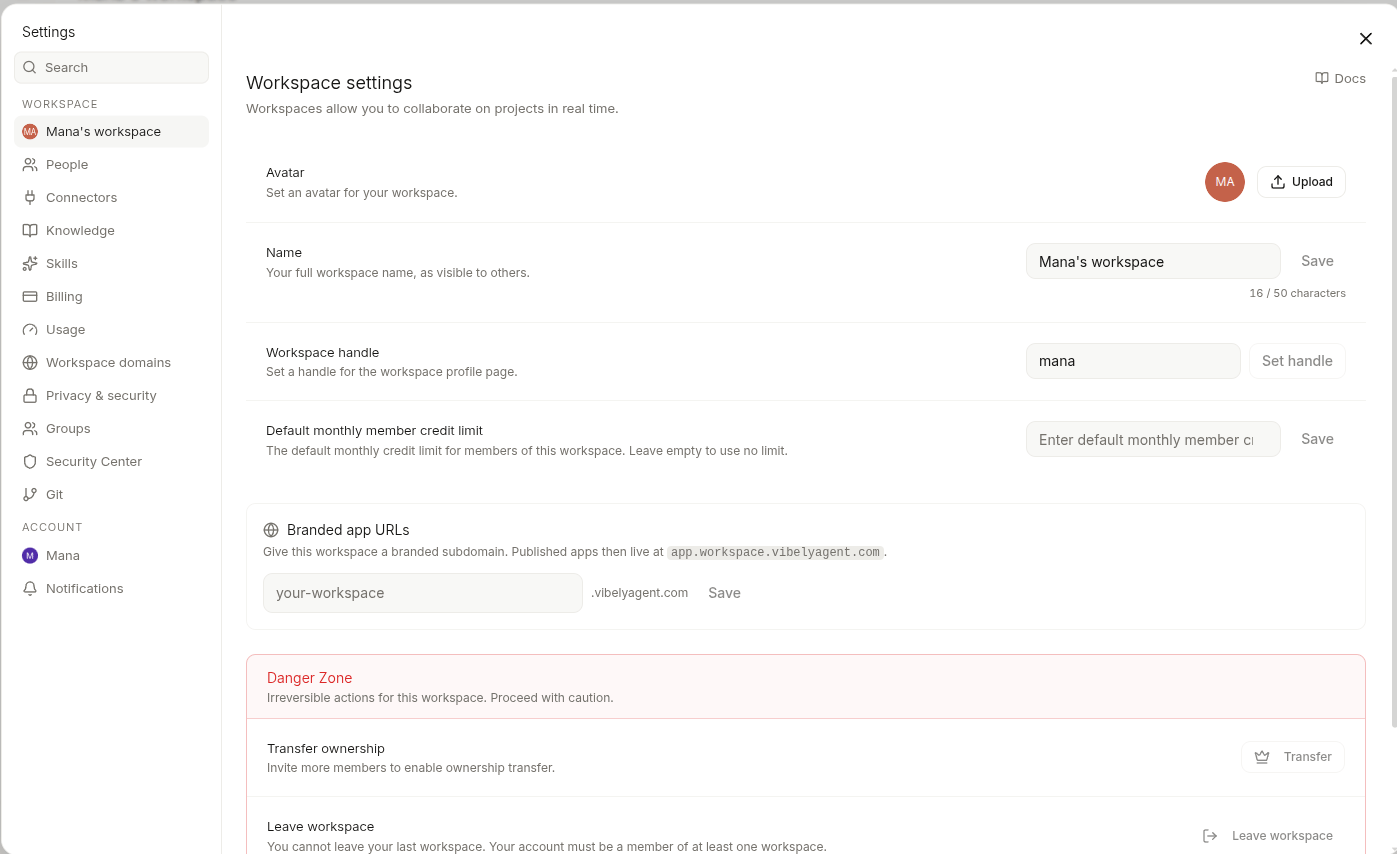 ## Identity
| Field | What it does | Limits |
| -------------------- | ---------------------------------------------------------- | ------------------------------------------- |
| **Name** | Shown in the sidebar, project URLs, and member lists | 50 characters |
| **Workspace handle** | Public handle. Used in shared links: `vibely.sh/@` | 3–32 chars, lowercase, hyphens allowed |
| **Avatar** | Shown next to the name everywhere | PNG/JPG, ≤256×256 displayed, ≤2 MB uploaded |
Workspace handle is **one-shot** — once claimed, you can change it but the old handle becomes available to others within 30 days. Plan accordingly if you've already shared links.
## Visibility
Workspace profile visibility has two modes:
* **Public** — name, avatar, workspace handle, and published-project list are visible at `vibely.sh/@`. Anonymous visitors can see your shipped builds.
* **Private** — none of the above is reachable without auth. Members can still see everything internally.
Default is **Private** for new workspaces. Flip to Public when you're ready to share your work publicly — e.g. for portfolios, agency case studies, or hackathon submissions.
## Invite behaviour
Two account-level settings affect how invites flow through your workspace:
* **Auto-accept invitations** (Account scope, per user) — when on, an invite to a workspace adds you immediately on the next sign-in instead of pinging you for explicit accept. Most useful if you bounce between many client workspaces in an agency setup.
* **Invite-only signup** (Workspace scope, admin) — when on, only invited emails can join. When off, anyone with a workspace join link can sign up.
These compose: an auto-accepting user invited to an invite-only workspace just joins, no prompts.
## Branding the generated apps
This page is about your **Vibely workspace identity** — what shows up in the dashboard, in URLs, in the sidebar.
It does **not** affect the apps you generate. A published build at `your-app.vibelyagent.com` ships with whatever branding the agent put in the code — favicons, meta tags, OG images. Edit those in code or prompt:
> "Set the favicon, OG image, and meta description to use \[paste your assets / brand]."
Custom domains for published apps live under [Web App Mode → Publish](/docs/web-app/publish).
## What admins control vs members see
| Setting | Admin can edit | Member can see | Member can edit own copy |
| --------------------- | -------------- | -------------- | ------------------------ |
| Workspace name | yes | yes | no |
| Workspace avatar | yes | yes | no |
| Workspace handle | yes | yes | no |
| Visibility | yes | yes | no |
| Invite-only signup | yes | yes | no |
| Member list | yes | yes | no |
| Connector secrets | yes | masked | no |
| Billing & plan | yes | no | no |
| Their own auto-accept | no | n/a | yes |
For who-can-do-what across roles, see [Workspace → People](/docs/workspace/people).
## Deleting a workspace
Admin-only, irreversible, takes 30 days to actually purge from backups.
* Every project in the workspace is archived (read-only) for the 30 days, then deleted.
* Connector OAuth tokens are revoked immediately at the third party.
* Published custom domains return 404 within an hour.
If you're an agency winding down a client, prefer **Transfer ownership** over delete — moves the workspace to the client's account so they own the codebase and the published URL.
## Identity
| Field | What it does | Limits |
| -------------------- | ---------------------------------------------------------- | ------------------------------------------- |
| **Name** | Shown in the sidebar, project URLs, and member lists | 50 characters |
| **Workspace handle** | Public handle. Used in shared links: `vibely.sh/@` | 3–32 chars, lowercase, hyphens allowed |
| **Avatar** | Shown next to the name everywhere | PNG/JPG, ≤256×256 displayed, ≤2 MB uploaded |
Workspace handle is **one-shot** — once claimed, you can change it but the old handle becomes available to others within 30 days. Plan accordingly if you've already shared links.
## Visibility
Workspace profile visibility has two modes:
* **Public** — name, avatar, workspace handle, and published-project list are visible at `vibely.sh/@`. Anonymous visitors can see your shipped builds.
* **Private** — none of the above is reachable without auth. Members can still see everything internally.
Default is **Private** for new workspaces. Flip to Public when you're ready to share your work publicly — e.g. for portfolios, agency case studies, or hackathon submissions.
## Invite behaviour
Two account-level settings affect how invites flow through your workspace:
* **Auto-accept invitations** (Account scope, per user) — when on, an invite to a workspace adds you immediately on the next sign-in instead of pinging you for explicit accept. Most useful if you bounce between many client workspaces in an agency setup.
* **Invite-only signup** (Workspace scope, admin) — when on, only invited emails can join. When off, anyone with a workspace join link can sign up.
These compose: an auto-accepting user invited to an invite-only workspace just joins, no prompts.
## Branding the generated apps
This page is about your **Vibely workspace identity** — what shows up in the dashboard, in URLs, in the sidebar.
It does **not** affect the apps you generate. A published build at `your-app.vibelyagent.com` ships with whatever branding the agent put in the code — favicons, meta tags, OG images. Edit those in code or prompt:
> "Set the favicon, OG image, and meta description to use \[paste your assets / brand]."
Custom domains for published apps live under [Web App Mode → Publish](/docs/web-app/publish).
## What admins control vs members see
| Setting | Admin can edit | Member can see | Member can edit own copy |
| --------------------- | -------------- | -------------- | ------------------------ |
| Workspace name | yes | yes | no |
| Workspace avatar | yes | yes | no |
| Workspace handle | yes | yes | no |
| Visibility | yes | yes | no |
| Invite-only signup | yes | yes | no |
| Member list | yes | yes | no |
| Connector secrets | yes | masked | no |
| Billing & plan | yes | no | no |
| Their own auto-accept | no | n/a | yes |
For who-can-do-what across roles, see [Workspace → People](/docs/workspace/people).
## Deleting a workspace
Admin-only, irreversible, takes 30 days to actually purge from backups.
* Every project in the workspace is archived (read-only) for the 30 days, then deleted.
* Connector OAuth tokens are revoked immediately at the third party.
* Published custom domains return 404 within an hour.
If you're an agency winding down a client, prefer **Transfer ownership** over delete — moves the workspace to the client's account so they own the codebase and the published URL.