> ## Documentation Index
> Fetch the complete documentation index at: https://docs.vibely.sh/docs/llms.txt
> Use this file to discover all available pages before exploring further.
# Skills
> Reusable instruction bundles the agent loads on demand — invoke from the composer with /skill-name.
A **skill** is a `SKILL.md` file that bundles a recipe the agent should follow when you invoke it. When you type `/skill-name` in the composer, Vibely injects the skill's instructions into the system prompt for that turn. The agent then runs that recipe — same context the always-on layers get, scoped to the moment you asked for it.
 Skills are the right home for flows you trigger sometimes, not always. "Build me a landing page the way I always do it." "Walk our team's deploy playbook." "Audit a Next.js project for accessibility." You don't want any of these firing on every turn — but you want them one slash command away.
## Where they live
**Settings → Skills.** The list shows every skill available in your current workspace — both the ones seeded by Vibely and the ones you've authored.
Each skill has:
* A **name** (what you type after the slash)
* A list of **modes** it surfaces in — web, mobile, design, or any combination
## Authoring a skill
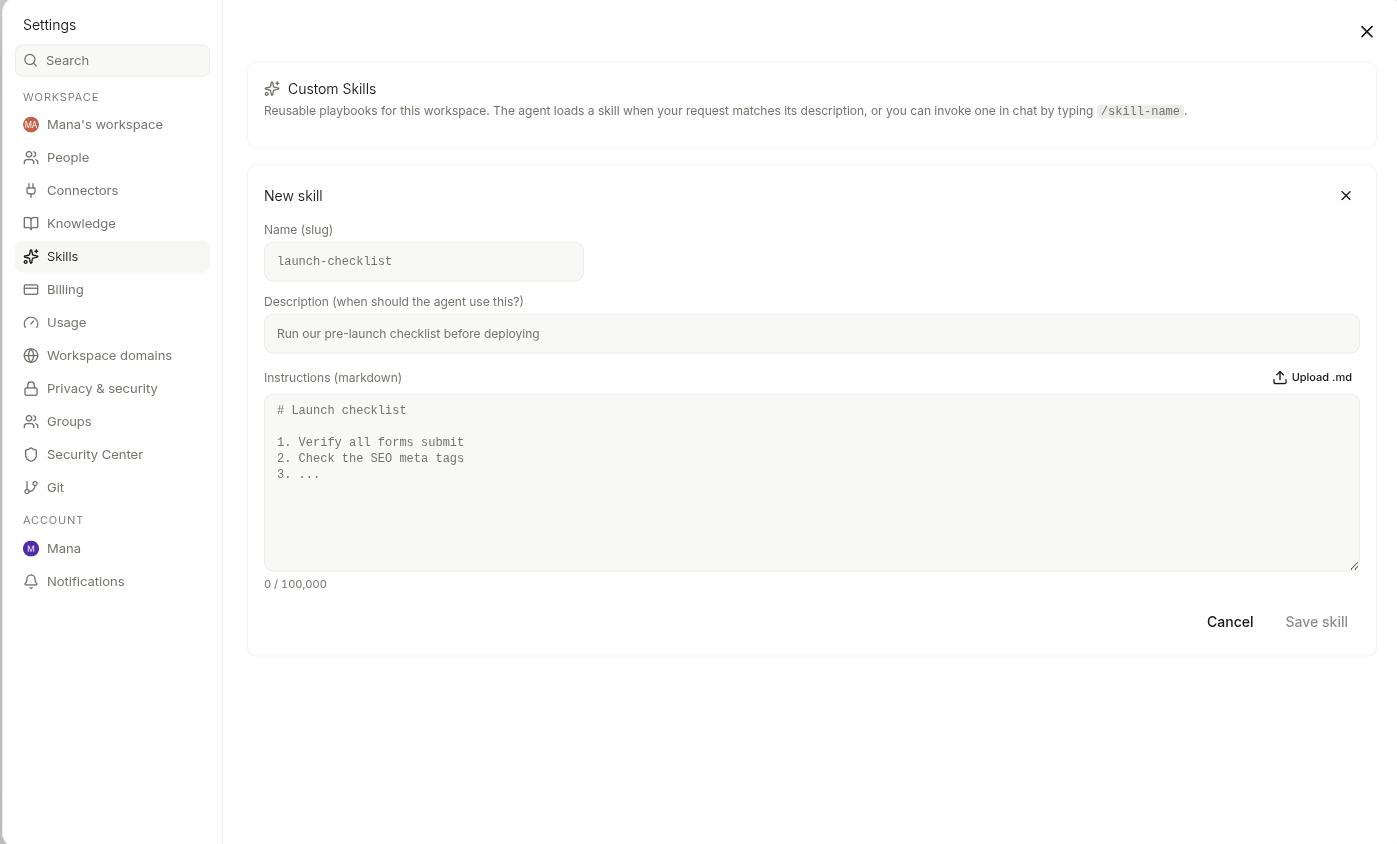
Open Settings → Skills → **New skill**. Give it a name, paste the `SKILL.md`, pick which modes it should surface in, and save. The skill is invocable from the composer immediately.
A `SKILL.md` is just Markdown. Write it like the handover note a colleague would actually find useful — what the goal is, the steps to follow, the conventions to apply, the gotchas to avoid. The agent reads the whole file when invoked.
### Uploading an existing SKILL.md
If you already have a `SKILL.md` somewhere — from another tool, a teammate's share, a previous project — drag the file into the new-skill dialog. Vibely parses the frontmatter (name, modes, description) so you don't retype it.
## Invoking from the composer
Type `/` in the composer to open the skills menu. Filter by name, click to insert, then send your prompt. The agent sees your prompt *and* the skill's instructions for that turn.
You can chain a skill with a normal prompt — `"/landing-page our new pricing announcement"` runs the landing-page skill scoped to that announcement.
## Mode-aware filtering
The composer only shows you skills that match the current mode:
* **Web App mode** surfaces skills marked `web`
* **Mobile App mode** surfaces skills marked `mobile`
* **Design mode** surfaces skills marked `design`
A skill marked for all three shows up everywhere. This keeps the menu short and avoids inviting the agent to run a mobile-only skill from a web project.
## Built-in skills
Vibely ships a curated catalog of skills out of the box — starters for the most common flows in web, mobile, and design mode. They appear in the same list as your own, marked as built-in. Treat them as both useful on their own *and* a reference for the shape of a good `SKILL.md` when you're authoring your own.
You can't edit a built-in skill, but you can copy it, edit the copy, and use yours instead.
## Workspace vs personal scope
* **Workspace** skills are visible to every member of the workspace. Use this for team playbooks, shared conventions, and anything you'd want a teammate to use the same way you do.
* **Personal** skills are only visible to you. Use this for your own habits or works-in-progress you don't want to push to the team yet.
Admins control who can author workspace skills under [Permissions](/docs/workspace/admin-settings).
## When to use a skill vs project memory vs knowledge
* **Skills** — on-demand recipes you invoke from the composer when you need them.
* **[Project memory](/docs/tips/memory)** — facts about *this project* the agent should remember on every turn (lives at `.mana/memory.md`).
* **Knowledge** — workspace facts the agent can search and cite mid-turn.
A good rule of thumb: if you'd run it from the composer a few times a week, skill. If it's a fact about this one project the agent should never forget, memory. If it's reference material the agent should look up, Knowledge.
## Related
Pin facts for the agent to remember in this project.
Where the composer menu lives for web builds.
Design-mode skills and the seeded catalog.
Map of every account- and workspace-level setting.
Skills are the right home for flows you trigger sometimes, not always. "Build me a landing page the way I always do it." "Walk our team's deploy playbook." "Audit a Next.js project for accessibility." You don't want any of these firing on every turn — but you want them one slash command away.
## Where they live
**Settings → Skills.** The list shows every skill available in your current workspace — both the ones seeded by Vibely and the ones you've authored.
Each skill has:
* A **name** (what you type after the slash)
* A list of **modes** it surfaces in — web, mobile, design, or any combination
## Authoring a skill
Open Settings → Skills → **New skill**. Give it a name, paste the `SKILL.md`, pick which modes it should surface in, and save. The skill is invocable from the composer immediately.
A `SKILL.md` is just Markdown. Write it like the handover note a colleague would actually find useful — what the goal is, the steps to follow, the conventions to apply, the gotchas to avoid. The agent reads the whole file when invoked.
### Uploading an existing SKILL.md
If you already have a `SKILL.md` somewhere — from another tool, a teammate's share, a previous project — drag the file into the new-skill dialog. Vibely parses the frontmatter (name, modes, description) so you don't retype it.
## Invoking from the composer
Type `/` in the composer to open the skills menu. Filter by name, click to insert, then send your prompt. The agent sees your prompt *and* the skill's instructions for that turn.
You can chain a skill with a normal prompt — `"/landing-page our new pricing announcement"` runs the landing-page skill scoped to that announcement.
## Mode-aware filtering
The composer only shows you skills that match the current mode:
* **Web App mode** surfaces skills marked `web`
* **Mobile App mode** surfaces skills marked `mobile`
* **Design mode** surfaces skills marked `design`
A skill marked for all three shows up everywhere. This keeps the menu short and avoids inviting the agent to run a mobile-only skill from a web project.
## Built-in skills
Vibely ships a curated catalog of skills out of the box — starters for the most common flows in web, mobile, and design mode. They appear in the same list as your own, marked as built-in. Treat them as both useful on their own *and* a reference for the shape of a good `SKILL.md` when you're authoring your own.
You can't edit a built-in skill, but you can copy it, edit the copy, and use yours instead.
## Workspace vs personal scope
* **Workspace** skills are visible to every member of the workspace. Use this for team playbooks, shared conventions, and anything you'd want a teammate to use the same way you do.
* **Personal** skills are only visible to you. Use this for your own habits or works-in-progress you don't want to push to the team yet.
Admins control who can author workspace skills under [Permissions](/docs/workspace/admin-settings).
## When to use a skill vs project memory vs knowledge
* **Skills** — on-demand recipes you invoke from the composer when you need them.
* **[Project memory](/docs/tips/memory)** — facts about *this project* the agent should remember on every turn (lives at `.mana/memory.md`).
* **Knowledge** — workspace facts the agent can search and cite mid-turn.
A good rule of thumb: if you'd run it from the composer a few times a week, skill. If it's a fact about this one project the agent should never forget, memory. If it's reference material the agent should look up, Knowledge.
## Related
Pin facts for the agent to remember in this project.
Where the composer menu lives for web builds.
Design-mode skills and the seeded catalog.
Map of every account- and workspace-level setting.