> ## Documentation Index
> Fetch the complete documentation index at: https://docs.vibely.sh/docs/llms.txt
> Use this file to discover all available pages before exploring further.
# Appearance
> Light, dark, and system theme — how Vibely remembers your choice and where it follows you.
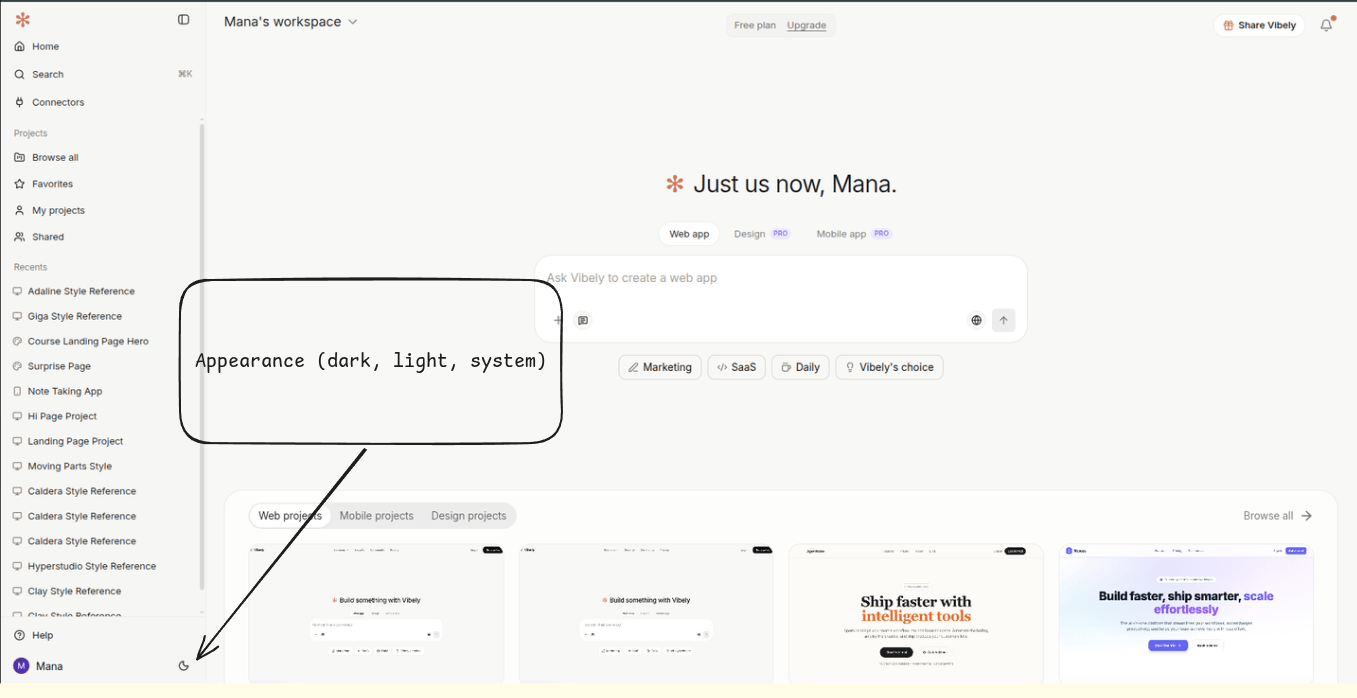
Vibely ships with three themes: **light**, **dark**, and **system** (follows your OS). System is the default for new accounts.
 ## Switching theme
Click your avatar in the top-right and pick **Appearance**, then choose one of:
* **Light** — bright UI with terracotta primary
* **Dark** — neutral grey UI with terracotta primary; the default after sunset on system
* **System** — follows your OS setting and re-checks when the OS theme changes
The change is instant and applies to every panel — chat, editor, preview, and the dashboard.
## How it persists
Your choice is saved to the browser's `localStorage` under the key `vibely:theme`. That means:
* It follows you in **the same browser**, on every device-signed-in tab.
* It does **not** follow you across browsers or devices — switching from your laptop to your phone will fall back to **system** until you set it again.
* Incognito / private windows start fresh on **system** every time.
We deliberately don't sync theme across devices: most people want dark on the laptop they code on after dinner, and light on the phone they check during the day. Forcing one choice across both makes both worse.
## What "system" actually does
`System` listens for the OS preference (`prefers-color-scheme: dark` in the browser). On macOS that flips at sunset if you're on auto Appearance; on Windows it follows your personalization setting; on Linux it follows your desktop environment's hint.
If you've explicitly picked Light or Dark, Vibely ignores the OS — your choice wins until you switch back to System.
## Generated apps inherit nothing
The theme you pick is **for the Vibely product**, not for the apps you build. A generated Vite + React project ships with its own `theme.css` and Tailwind config; that's edited in code (or by prompting the agent), not from the avatar menu.
If you want your generated app to default to dark, prompt:
> "Default the app to dark mode on first load, with a toggle in the navbar."
## Accent colour
The product accent is fixed to Vibely terracotta (`#C97B5E`). There's no UI to swap it. Theme tokens *inside* a generated project (Tailwind colours, design tokens, theme.css) are fully yours — edit them in code.
## Switching theme
Click your avatar in the top-right and pick **Appearance**, then choose one of:
* **Light** — bright UI with terracotta primary
* **Dark** — neutral grey UI with terracotta primary; the default after sunset on system
* **System** — follows your OS setting and re-checks when the OS theme changes
The change is instant and applies to every panel — chat, editor, preview, and the dashboard.
## How it persists
Your choice is saved to the browser's `localStorage` under the key `vibely:theme`. That means:
* It follows you in **the same browser**, on every device-signed-in tab.
* It does **not** follow you across browsers or devices — switching from your laptop to your phone will fall back to **system** until you set it again.
* Incognito / private windows start fresh on **system** every time.
We deliberately don't sync theme across devices: most people want dark on the laptop they code on after dinner, and light on the phone they check during the day. Forcing one choice across both makes both worse.
## What "system" actually does
`System` listens for the OS preference (`prefers-color-scheme: dark` in the browser). On macOS that flips at sunset if you're on auto Appearance; on Windows it follows your personalization setting; on Linux it follows your desktop environment's hint.
If you've explicitly picked Light or Dark, Vibely ignores the OS — your choice wins until you switch back to System.
## Generated apps inherit nothing
The theme you pick is **for the Vibely product**, not for the apps you build. A generated Vite + React project ships with its own `theme.css` and Tailwind config; that's edited in code (or by prompting the agent), not from the avatar menu.
If you want your generated app to default to dark, prompt:
> "Default the app to dark mode on first load, with a toggle in the navbar."
## Accent colour
The product accent is fixed to Vibely terracotta (`#C97B5E`). There's no UI to swap it. Theme tokens *inside* a generated project (Tailwind colours, design tokens, theme.css) are fully yours — edit them in code.