> ## Documentation Index
> Fetch the complete documentation index at: https://docs.vibely.sh/docs/llms.txt
> Use this file to discover all available pages before exploring further.
# Connectors
> Plug in third-party services — for the app you ship, the agent that builds it, or both.
# Connectors
Vibely connectors come in **two flavours**, and they do different jobs.
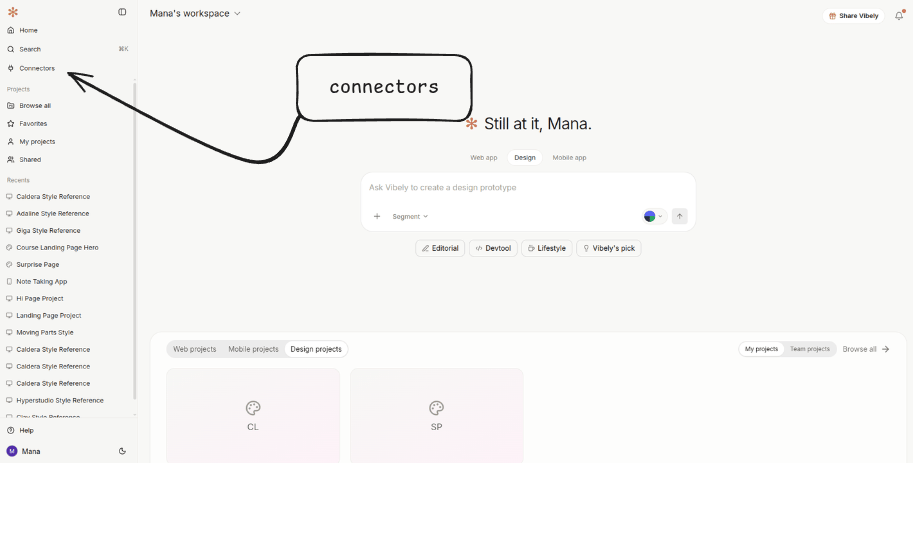 | Surface | What it does | Where it runs |
| ------------------------- | ------------------------------------------------------------------------------------------------------------------------------------------------------ | ---------------------------------------------------------------------- |
| **App connectors** | Scaffold typed SDK code and secret-handling into your project, so the **app you ship** can call a third-party service at runtime. | Your built app — edge functions, backend routes, or the client bundle. |
| **MCP / Chat connectors** | Give the Vibely agent **build-time context** — read your Linear issues, browse your Figma file, look at your Sentry errors — to inform what it builds. | Inside the Vibely chat / build session. Never deployed with your app. |
Some services carry **both surfaces** (Notion, Linear, Stripe, Slack, HubSpot, PostHog, Amplitude, Sentry, Shopify, Sanity, Contentful, Resend, Google Calendar, GitHub — currently \~13). Connect each one once on each side; they're independent.
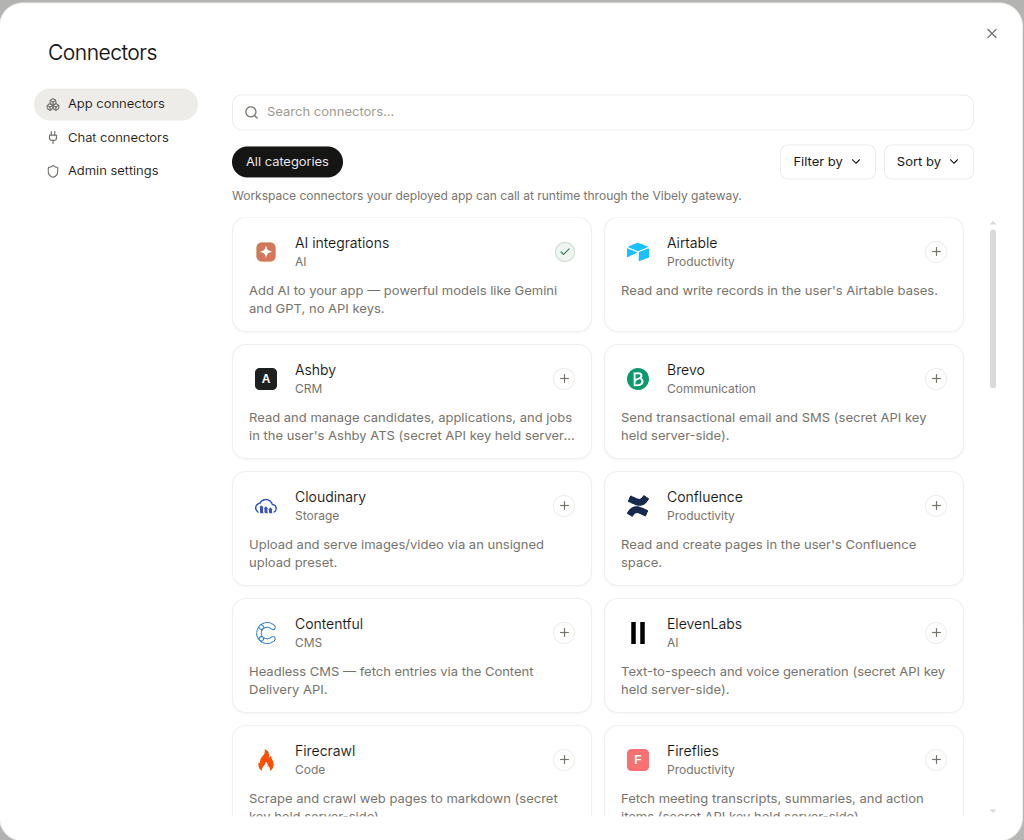
Every App connector Vibely ships with, plus which ones also carry an MCP surface.
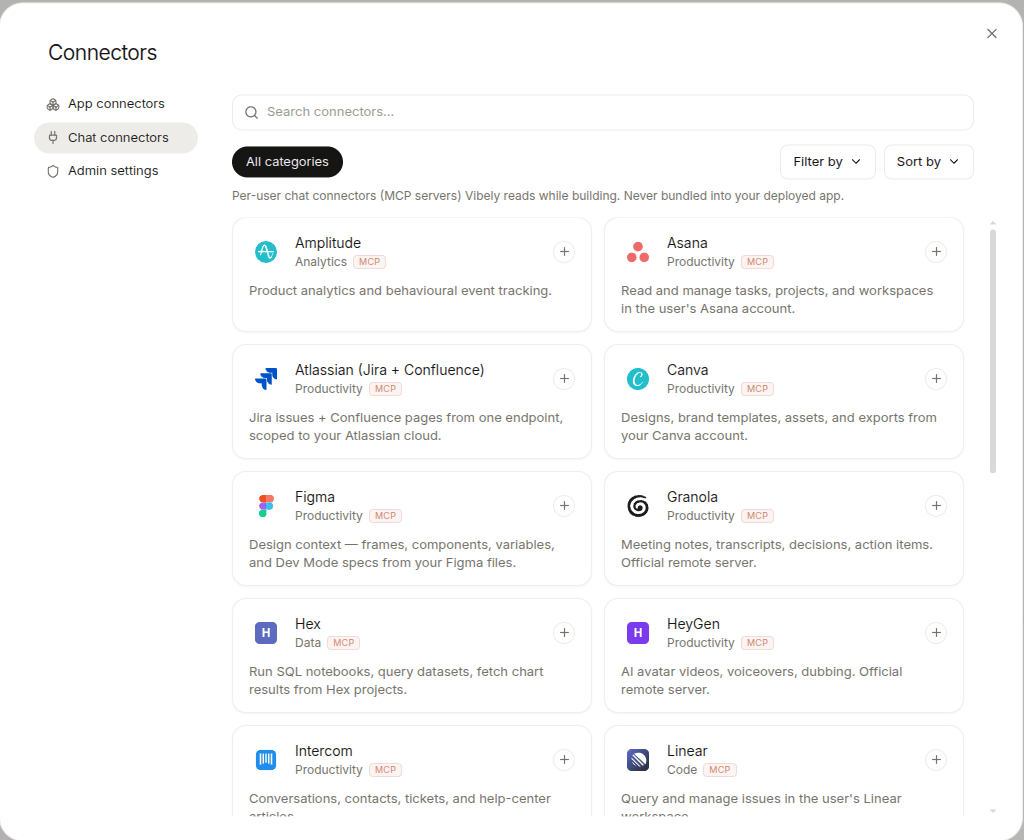
The 46+ services the agent can read while building — Figma, Atlassian, Neon, and more.
First-party app-side wiring: Supabase, Stripe, Razorpay, Resend, Tavily, Firecrawl, Google AI.
Where each credential lives, scope policy, and what the agent never sees.
## Which one do I need?
Use the question, not the brand name.
| Question | Surface |
| --------------------------------------------------------------------------------------------------------------------- | ------------------------------------------------------- |
| *"Should the **app** I'm building do something with Slack?"* (send a message, read a channel) | **App connector** |
| *"Should the **agent** read my Linear tickets while it builds?"* (so it generates code that matches existing tickets) | **MCP / Chat connector** |
| *"Both — agent reads my Notion docs to scaffold the project, and the deployed app writes back to Notion."* | **Connect once in each section** — they're independent. |
If you connect Slack as an **MCP** connector and then ask the agent to "send a Slack message when a user signs up," the agent will tell you that's an App-side capability and walk you through adding the App connector. The two surfaces don't substitute for each other.
## How App connectors work
When you ask the agent to wire a third-party service into your project, it picks the right connector, scaffolds typed files into your codebase, and asks you to connect the service in the Connectors panel.
| Surface | What it does | Where it runs |
| ------------------------- | ------------------------------------------------------------------------------------------------------------------------------------------------------ | ---------------------------------------------------------------------- |
| **App connectors** | Scaffold typed SDK code and secret-handling into your project, so the **app you ship** can call a third-party service at runtime. | Your built app — edge functions, backend routes, or the client bundle. |
| **MCP / Chat connectors** | Give the Vibely agent **build-time context** — read your Linear issues, browse your Figma file, look at your Sentry errors — to inform what it builds. | Inside the Vibely chat / build session. Never deployed with your app. |
Some services carry **both surfaces** (Notion, Linear, Stripe, Slack, HubSpot, PostHog, Amplitude, Sentry, Shopify, Sanity, Contentful, Resend, Google Calendar, GitHub — currently \~13). Connect each one once on each side; they're independent.
Every App connector Vibely ships with, plus which ones also carry an MCP surface.
The 46+ services the agent can read while building — Figma, Atlassian, Neon, and more.
First-party app-side wiring: Supabase, Stripe, Razorpay, Resend, Tavily, Firecrawl, Google AI.
Where each credential lives, scope policy, and what the agent never sees.
## Which one do I need?
Use the question, not the brand name.
| Question | Surface |
| --------------------------------------------------------------------------------------------------------------------- | ------------------------------------------------------- |
| *"Should the **app** I'm building do something with Slack?"* (send a message, read a channel) | **App connector** |
| *"Should the **agent** read my Linear tickets while it builds?"* (so it generates code that matches existing tickets) | **MCP / Chat connector** |
| *"Both — agent reads my Notion docs to scaffold the project, and the deployed app writes back to Notion."* | **Connect once in each section** — they're independent. |
If you connect Slack as an **MCP** connector and then ask the agent to "send a Slack message when a user signs up," the agent will tell you that's an App-side capability and walk you through adding the App connector. The two surfaces don't substitute for each other.
## How App connectors work
When you ask the agent to wire a third-party service into your project, it picks the right connector, scaffolds typed files into your codebase, and asks you to connect the service in the Connectors panel.
 ```
You: "Send a Slack message to #revenue when a Stripe payment succeeds"
Agent:
├─ scaffolds the Stripe checkout + webhook handler
├─ scaffolds the Slack OAuth-proxied client
└─ asks you to click "Connect Slack" in the Connectors panel
```
Behind the scenes there are **four scaffold patterns** the agent picks between, based on how the upstream API expects to be called:
1. **Direct client.** The connector's key is safe to ship in the browser/mobile bundle (public DSN, Storefront token, dataset id). The agent installs the upstream SDK and reads its key from `VITE_*` (web) or `EXPO_PUBLIC_*` (mobile). Examples: Sanity, Contentful, Shopify Storefront, PostHog, Sentry, Amplitude.
2. **REST client with a key from the bundle (web only).** Used for Resend, Perplexity, Firecrawl, ElevenLabs. The mobile variant is intentionally blocked because bundling a server key into an APK leaks it; mobile apps get routed through the Edge-Function pattern instead.
3. **Supabase Edge Function proxy.** A Deno function holds the secret in Supabase Vault and proxies HTTP calls. The client wrapper invokes it via `supabase.functions.invoke(slug, ...)`. This is what Telegram, Notion, Linear, Jira, BigQuery, Snowflake, etc. ship today.
4. **OAuth via Vibely.** Gmail, Slack, and a growing set run on a Vibely-hosted OAuth proxy. Vibely handles the OAuth dance, holds refreshed tokens, and forwards each call.
## How MCP / Chat connectors work
MCP (Model Context Protocol) connectors don't write any code into your project. They expose a set of tools — *list issues*, *get page*, *search nodes* — that the agent can call **during the build conversation** to pull live data.
```
You: "Send a Slack message to #revenue when a Stripe payment succeeds"
Agent:
├─ scaffolds the Stripe checkout + webhook handler
├─ scaffolds the Slack OAuth-proxied client
└─ asks you to click "Connect Slack" in the Connectors panel
```
Behind the scenes there are **four scaffold patterns** the agent picks between, based on how the upstream API expects to be called:
1. **Direct client.** The connector's key is safe to ship in the browser/mobile bundle (public DSN, Storefront token, dataset id). The agent installs the upstream SDK and reads its key from `VITE_*` (web) or `EXPO_PUBLIC_*` (mobile). Examples: Sanity, Contentful, Shopify Storefront, PostHog, Sentry, Amplitude.
2. **REST client with a key from the bundle (web only).** Used for Resend, Perplexity, Firecrawl, ElevenLabs. The mobile variant is intentionally blocked because bundling a server key into an APK leaks it; mobile apps get routed through the Edge-Function pattern instead.
3. **Supabase Edge Function proxy.** A Deno function holds the secret in Supabase Vault and proxies HTTP calls. The client wrapper invokes it via `supabase.functions.invoke(slug, ...)`. This is what Telegram, Notion, Linear, Jira, BigQuery, Snowflake, etc. ship today.
4. **OAuth via Vibely.** Gmail, Slack, and a growing set run on a Vibely-hosted OAuth proxy. Vibely handles the OAuth dance, holds refreshed tokens, and forwards each call.
## How MCP / Chat connectors work
MCP (Model Context Protocol) connectors don't write any code into your project. They expose a set of tools — *list issues*, *get page*, *search nodes* — that the agent can call **during the build conversation** to pull live data.
 ```
You: "Pull last week's high-priority Linear issues and turn them into a status doc"
Agent:
├─ calls the Linear MCP server's list_issues tool
└─ writes the markdown doc into your project
```
Side-effecting actions on an MCP surface (send email, create issue, post message) only fire when you explicitly ask. See [MCP / Chat connectors](/docs/connectors/mcp) for the full catalog and how to add one.
## What's available
* App connectors — see the live [Catalog](/docs/connectors/catalog) for the current list.
* MCP / Chat connectors — see [MCP / Chat connectors](/docs/connectors/mcp) for the current list and categories.
* A subset of services carry **both surfaces** — connect each one once per surface.
* **4 scaffold patterns for App** (direct, REST web-only, Edge Function proxy, OAuth via Vibely).
* **6 MCP categories** — dev, knowledge, productivity, data, monitoring, generic (incl. bring-your-own).
The catalogue rotates as new connectors land. The two catalog pages are the source of truth for what's connected today.
### Native integrations (first-party)
These deliberately stay out of the connectors catalog — the agent's system prompt, templates, and tools know about them at a deeper level:
| Integration | What it does |
| ----------- | ---------------------------------------------------------------------- |
| Supabase | Auth, Postgres, Storage, Edge Functions — the default backend. |
| Stripe | Subscriptions, one-time payments, webhooks (web only). |
| Razorpay | India-friendly alternative to Stripe. Also Vibely's own billing rails. |
| Resend | Transactional email; the App connector scaffolds the same client. |
| Tavily | Web search inside the build agent. |
| Firecrawl | Web scraping inside the build agent. |
| Google AI | Image generation, image edit, video generation tools. |
First-party integrations are **App-side only.** For build-time context from the same vendor (e.g. agent-side Figma access), use [MCP / Chat connectors](/docs/connectors/mcp).
See [Native integrations](/docs/connectors/native) for setup details.
## Asking for a connector
The agent picks the right one from your prompt, but you can name it explicitly:
> *"Add the Slack App connector. When a user signs up, post their email to `#new-signups`."*
>
> *"Connect Figma as an MCP server so you can read the design tokens while building."*
If a service you want isn't in either catalog, ask anyway — for many public REST APIs the agent can write a direct fetch wrapper plus an Edge Function in one turn.
## Limits
* **Rate limits are the third party's.** Vibely doesn't proxy or buffer — your app talks to Slack / Linear / BigQuery directly (or via the OAuth proxy for Gmail / Slack, which mirrors upstream limits).
* **No long-running workers.** App connectors run from request handlers and Edge Functions. For scheduled jobs, use Supabase pg\_cron or roll your own background queue.
* **Mobile-incompatible web App connectors.** Resend, Perplexity, ElevenLabs, Firecrawl scaffold for web only — using them from an Expo project requires an Edge Function instead.
* **MCP / Chat connectors don't ship with your app.** They're build-time only. If you need the same data at runtime, add the matching App connector too.
```
You: "Pull last week's high-priority Linear issues and turn them into a status doc"
Agent:
├─ calls the Linear MCP server's list_issues tool
└─ writes the markdown doc into your project
```
Side-effecting actions on an MCP surface (send email, create issue, post message) only fire when you explicitly ask. See [MCP / Chat connectors](/docs/connectors/mcp) for the full catalog and how to add one.
## What's available
* App connectors — see the live [Catalog](/docs/connectors/catalog) for the current list.
* MCP / Chat connectors — see [MCP / Chat connectors](/docs/connectors/mcp) for the current list and categories.
* A subset of services carry **both surfaces** — connect each one once per surface.
* **4 scaffold patterns for App** (direct, REST web-only, Edge Function proxy, OAuth via Vibely).
* **6 MCP categories** — dev, knowledge, productivity, data, monitoring, generic (incl. bring-your-own).
The catalogue rotates as new connectors land. The two catalog pages are the source of truth for what's connected today.
### Native integrations (first-party)
These deliberately stay out of the connectors catalog — the agent's system prompt, templates, and tools know about them at a deeper level:
| Integration | What it does |
| ----------- | ---------------------------------------------------------------------- |
| Supabase | Auth, Postgres, Storage, Edge Functions — the default backend. |
| Stripe | Subscriptions, one-time payments, webhooks (web only). |
| Razorpay | India-friendly alternative to Stripe. Also Vibely's own billing rails. |
| Resend | Transactional email; the App connector scaffolds the same client. |
| Tavily | Web search inside the build agent. |
| Firecrawl | Web scraping inside the build agent. |
| Google AI | Image generation, image edit, video generation tools. |
First-party integrations are **App-side only.** For build-time context from the same vendor (e.g. agent-side Figma access), use [MCP / Chat connectors](/docs/connectors/mcp).
See [Native integrations](/docs/connectors/native) for setup details.
## Asking for a connector
The agent picks the right one from your prompt, but you can name it explicitly:
> *"Add the Slack App connector. When a user signs up, post their email to `#new-signups`."*
>
> *"Connect Figma as an MCP server so you can read the design tokens while building."*
If a service you want isn't in either catalog, ask anyway — for many public REST APIs the agent can write a direct fetch wrapper plus an Edge Function in one turn.
## Limits
* **Rate limits are the third party's.** Vibely doesn't proxy or buffer — your app talks to Slack / Linear / BigQuery directly (or via the OAuth proxy for Gmail / Slack, which mirrors upstream limits).
* **No long-running workers.** App connectors run from request handlers and Edge Functions. For scheduled jobs, use Supabase pg\_cron or roll your own background queue.
* **Mobile-incompatible web App connectors.** Resend, Perplexity, ElevenLabs, Firecrawl scaffold for web only — using them from an Expo project requires an Edge Function instead.
* **MCP / Chat connectors don't ship with your app.** They're build-time only. If you need the same data at runtime, add the matching App connector too.