> ## Documentation Index
> Fetch the complete documentation index at: https://docs.vibely.sh/llms.txt
> Use this file to discover all available pages before exploring further.
# MCP Servers API
> Manage external MCP server connections
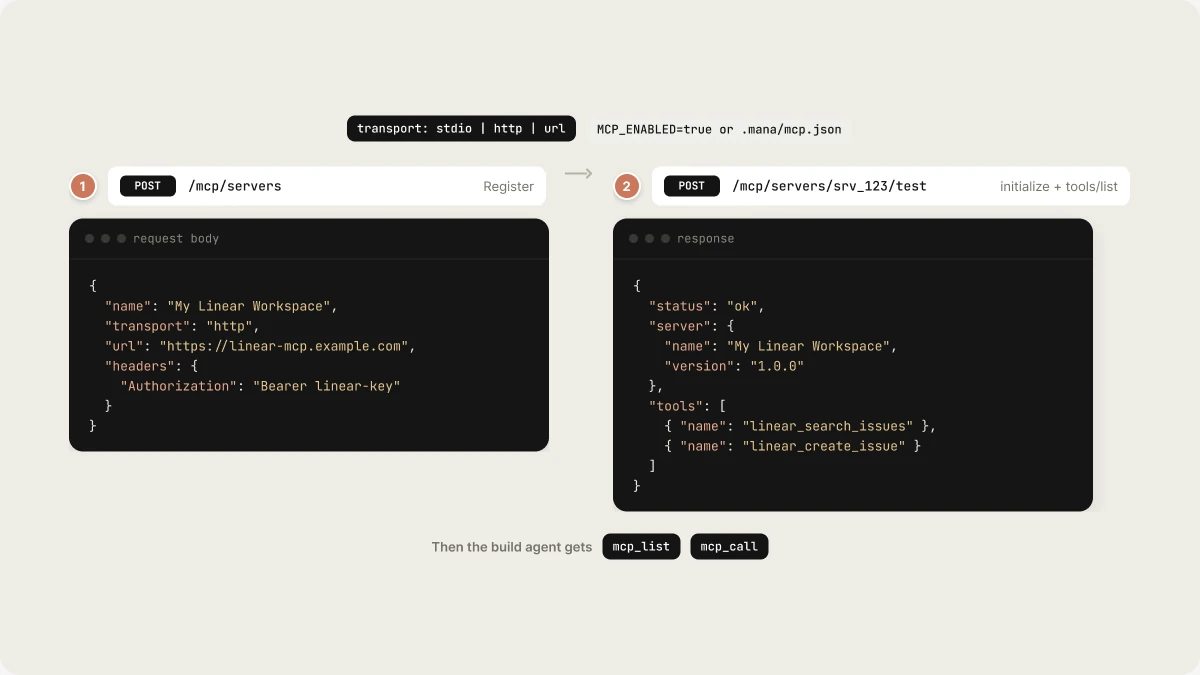
Vibely connects to external MCP (Model Context Protocol) servers, giving the build agent access to your tools, APIs, and data sources. The MCP Servers API lets you register, test, and manage those connections.
 ## Endpoints
| Method | Path | Purpose |
| - | - | - |
| `GET` | `/api/v1/mcp/catalog` | List available MCP server templates |
| `GET` | `/api/v1/mcp/info` | Get MCP client configuration |
| `GET` | `/api/v1/mcp/servers` | List connected MCP servers |
| `POST` | `/api/v1/mcp/servers` | Register a new MCP server |
| `DELETE` | `/api/v1/mcp/servers/:id` | Remove an MCP server |
| `POST` | `/api/v1/mcp/servers/:id/test` | Test connectivity to a server |
| `GET` | `/api/v1/mcp/oauth/begin` | Initiate OAuth for an MCP server |
| `GET` | `/api/v1/mcp/oauth/callback` | OAuth callback handler |
| `POST` | `/api/v1/mcp/servers/:id/oauth/start` | Start OAuth for an already-registered server |
## Register a server
```http theme={"system"}
POST /api/v1/mcp/servers
Authorization: Bearer
Content-Type: application/json
{
"name": "My Linear Workspace",
"transport": "http",
"url": "https://linear-mcp.example.com",
"headers": {
"Authorization": "Bearer linear-key"
}
}
```
### Transport types
| Transport | Description |
| - | - |
| `stdio` | Local process (command + args) |
| `http` | Remote HTTP/SSE endpoint |
| `url` | Streamable HTTP URL |
## Test a server
```http theme={"system"}
POST /api/v1/mcp/servers/srv_123/test
Authorization: Bearer
```
Returns the result of `initialize` + `tools/list` against the server:
```json theme={"system"}
{
"status": "ok",
"server": {
"name": "My Linear Workspace",
"version": "1.0.0"
},
"tools": [
{ "name": "linear_search_issues", "description": "Search Linear issues" },
{ "name": "linear_create_issue", "description": "Create a Linear issue" }
]
}
```
## How the agent uses MCP
When MCP is enabled (`MCP_ENABLED=true` or a config at `.mana/mcp.json`), the build agent gains three tools:
* `mcp_list` — list tools from all connected MCP servers
* `mcp_call` — invoke a tool on a specific server
Configure servers in `.mana/mcp.json` (see `.mana/mcp.example.json` for a starter config).
## Related topics
- [MCP Client Overview](/reference/mcp/overview.md)
- [API Overview](/api-reference/overview.md)
- [Vibely MCP server](/integrations/vibely-mcp-server.md)
- [Connect a custom MCP server](/integrations/connectors/custom-mcp.md)
- [External MCP Servers](/reference/mcp/external-servers.md)
This documentation is built and hosted on [Mintlify](https://mintlify.com), a developer documentation platform.
## Endpoints
| Method | Path | Purpose |
| - | - | - |
| `GET` | `/api/v1/mcp/catalog` | List available MCP server templates |
| `GET` | `/api/v1/mcp/info` | Get MCP client configuration |
| `GET` | `/api/v1/mcp/servers` | List connected MCP servers |
| `POST` | `/api/v1/mcp/servers` | Register a new MCP server |
| `DELETE` | `/api/v1/mcp/servers/:id` | Remove an MCP server |
| `POST` | `/api/v1/mcp/servers/:id/test` | Test connectivity to a server |
| `GET` | `/api/v1/mcp/oauth/begin` | Initiate OAuth for an MCP server |
| `GET` | `/api/v1/mcp/oauth/callback` | OAuth callback handler |
| `POST` | `/api/v1/mcp/servers/:id/oauth/start` | Start OAuth for an already-registered server |
## Register a server
```http theme={"system"}
POST /api/v1/mcp/servers
Authorization: Bearer
Content-Type: application/json
{
"name": "My Linear Workspace",
"transport": "http",
"url": "https://linear-mcp.example.com",
"headers": {
"Authorization": "Bearer linear-key"
}
}
```
### Transport types
| Transport | Description |
| - | - |
| `stdio` | Local process (command + args) |
| `http` | Remote HTTP/SSE endpoint |
| `url` | Streamable HTTP URL |
## Test a server
```http theme={"system"}
POST /api/v1/mcp/servers/srv_123/test
Authorization: Bearer
```
Returns the result of `initialize` + `tools/list` against the server:
```json theme={"system"}
{
"status": "ok",
"server": {
"name": "My Linear Workspace",
"version": "1.0.0"
},
"tools": [
{ "name": "linear_search_issues", "description": "Search Linear issues" },
{ "name": "linear_create_issue", "description": "Create a Linear issue" }
]
}
```
## How the agent uses MCP
When MCP is enabled (`MCP_ENABLED=true` or a config at `.mana/mcp.json`), the build agent gains three tools:
* `mcp_list` — list tools from all connected MCP servers
* `mcp_call` — invoke a tool on a specific server
Configure servers in `.mana/mcp.json` (see `.mana/mcp.example.json` for a starter config).
## Related topics
- [MCP Client Overview](/reference/mcp/overview.md)
- [API Overview](/api-reference/overview.md)
- [Vibely MCP server](/integrations/vibely-mcp-server.md)
- [Connect a custom MCP server](/integrations/connectors/custom-mcp.md)
- [External MCP Servers](/reference/mcp/external-servers.md)
This documentation is built and hosted on [Mintlify](https://mintlify.com), a developer documentation platform.